Moving PostgreSQL to always-on storage
PostgreSQL moved from an on-demand GPU server to a 24/7 Mac Mini. This infrastructure setup retains pgvector and updates connection settings, macOS support and backups.
Migration overview
I moved PostgreSQL from compute.home.arpa to always-on storage.home.arpa. The homelab has three nodes: storage.home.arpa (Mac Mini 2018, 24/7), desktop.home.arpa (development machine), and compute.home.arpa (on-demand GPU box). I also updated connection settings and devstack.
Why PostgreSQL Was on compute
The original layout looked like this:
  storage.home.arpa (Mac Mini 2018, Ubuntu, 24/7)
  -- MinIO, Prometheus, Loki, Vector

desktop.home.arpa
  -- familiar (agent-gateway), NATS

compute.home.arpa (GPU box, on-demand)
  -- PostgreSQL, Dagster, MLflow, vLLM, llama.cpp
PostgreSQL initially shared compute with Dagster and MLflow for direct access. Docker Compose resolved the service name postgres as its hostname.
Since compute starts on demand, checking the database or running dbt from desktop required starting the GPU box. Rebuilding compute also required handling its persistent data.
Evaluating storage capacity
I evaluated moving PostgreSQL to storage.home.arpa. The concern was whether a Mac Mini 2018 (i7-8700B, 16GB RAM) could handle the load.
First, I mapped out the data characteristics. PostgreSQL was hosting three databases:
agent_gateway: main app DB (document_chunks, chat_history, session, lineage)dagster: Dagster execution metadatamlflow: MLflow experiment tracking
The databases hold metadata, text and vectors. Parquet files and artifacts go to MinIO. The pg_dump output was a few MB, so I expected light I/O for this workload.
The overall data architecture:
| Location | Role | Data Examples |
|---|---|---|
| PostgreSQL (storage) | Metadata + aggregation + pgvector | session, lineage, embeddings, dbt materialized |
| MinIO (storage) | Actual files | Parquet, Iceberg data, MLflow artifacts |
| DuckDB (compute) | Transform/aggregation workbench | Dagster pipeline intermediate data |
DuckDB is a volatile workbench. If it disappears, Dagster jobs can regenerate it. The source of truth lives in PostgreSQL and MinIO.
With PostgreSQL always available, desktop can use dbt without starting compute. This infrastructure setup separates persistent storage from on-demand computation.
Keeping pgvector integrated
During the migration planning, I also considered splitting pgvector out of PostgreSQL and running Qdrant on compute.
Qdrant could use compute’s CPU and memory for HNSW search. I considered it for higher RPS, but it introduced these problems:
- Dual management of
document_chunks(text + metadata in PG, vectors in Qdrant) - Go app repository code would need rewriting for the Qdrant client
- Embedding search is unavailable while the on-demand compute host is stopped
External APIs such as Gemini still need embedding search while compute is stopped. That requirement determined the choice.
Reconfirming the benefits of keeping pgvector integrated:
- embedding + metadata + chat_history can be JOINed in the same DB
- Cross-cutting queries via
correlation_idin a single query - No dual management
- Single backup target
Embedding search performs one HNSW query per user query. Even with aichat and Zed together, the expected rate was 2–5 RPS. The 18 RPS figure referred to NATS Dagster events, which are lightweight metadata INSERTs.
I kept pgvector in PostgreSQL and moved it to storage. If performance becomes a problem, the planned order is ef_search tuning, shared_buffers adjustment, then Qdrant@compute.
Implementation: Rewriting Go Config and Compose
The Go side required minimal changes. config.go was deriving DSNs from COMPUTE_HOST, so I just added POSTGRES_HOST to decouple it:
  // internal/config/defaults.go
const DefaultPostgresHost = DefaultStorageHost // storage.home.arpa

// internal/config/config.go
postgresHost := envOr("POSTGRES_HOST", DefaultPostgresHost)
User mapping was also updated:
| Purpose | User | DB |
|---|---|---|
| Application | agent | agent_gateway |
| Infra metadata | system | dagster, mlflow |
| Admin | ksh3 | All DBs |
compute-compose.yaml was substantially restructured:
  # Removed: postgres service block and postgres-data volume

# MLflow: point backend-store-uri to storage
mlflow:
  environment:
    BACKEND_STORE_URI: postgresql://system@storage.home.arpa:5432/mlflow

# Dagster: inject PG host via environment variables
dagster-webserver:
  environment:
    DAGSTER_PG_HOST: storage.home.arpa
    DAGSTER_PG_USER: system
    POSTGRES_DSN: postgresql://agent@storage.home.arpa:5432/agent_gateway

# Added restart: on-failure to all services (PG connection retry)
Removed all depends_on: postgres, replaced with restart: on-failure to cover PG startup timing. Both Dagster and MLflow have built-in connection retry, so they connect automatically once PostgreSQL on storage is up.
PostgreSQL on storage runs as a systemd quadlet. The image is a custom build on postgres:18-trixie with JIT + pgvector enabled. Tuned for the Mac Mini:
  shared_buffers = 2GB      # 16GB RAM shared with other services
effective_cache_size = 6GB
work_mem = 64MB
shm_size = 2GB            # reduced from compute's 4GB
Init scripts were converted from .sql to .sh, handling user creation, DB creation, pgvector extensions, and permissions in one shot.
go build ./... # clean
Devstack macOS Compatibility
In parallel with the PostgreSQL migration, I fixed homelab/desktop-containers/compose.yaml to work on macOS.
Several Linux-only settings had crept in:
| Issue | Fix |
|---|---|
node-exporter privileged: true + pid: host | Removed (useless in macOS VM) |
/:/host:ro,rslave mount | Removed rslave (macOS Docker Desktop incompatible) |
version: "3.9" | Removed (deprecated) |
/private/var/log path | macOS /var/log is a symlink |
Grafana and Prometheus work on macOS as-is. node-exporter has limited functionality on macOS, but compute and storage metrics come through fine, so no practical impact.
Backup and Symlink Design
Checked the symlink duplication risk in compute-containers/runtime/backup/backup-runner.sh.
  BACKUP_ROOT=/srv/persistent/backup
WORKSPACE_ROOT="${WORKSPACE_ROOT:-/mnt/data/workspace}"
A /opt → /mnt/data/workspace symlink does not duplicate this backup. backup-runner.sh uses WORKSPACE_ROOT directly, and tar normally archives the symlink itself. --follow-symlinks or another backup targeting /opt requires a separate check.
ctree Checkpoints and argus
I added create_checkpoint to argus’s ctree for saving files at work boundaries. It complements the diff display in get_revs.
Found a ctree bug during this work: get_affected and get_depends fail to detect symbol references in some cases:
  ctree.get_affected(name="reject_removed_paging_args")  -> no references (actually called from dispatch)
ctree.get_depends(dep="reject_removed_paging_args")     -> "no dependencies found"
Fixed in a separate session.
At the time of writing, familiar’s Application Layer handled agent-mode tool execution, workspace management and MCP server management.
  Transport Layer (Gin)
    |
    +--- (agent mode) ---> Application Layer [internal/agent/]
    |                         +- loop.go          orchestration loop
    |                         +- orchestrator_runtime.go
    |                         +- intent_packet.go
    |                         +- tools.go         MCP tool definitions
    |                         +- executor/        file, git, shell
    |                         +- mcp/             MCP server management
    |                         +- workspace/       session management
    v                                |
Domain Layer <-----------------------+
Normal API requests flow Transport -> Domain -> Infra, but in agent mode, Transport runs the orchestration loop through the Application Layer.
Layout after migration
The three-node setup after migration:
  storage.home.arpa (Mac Mini 2018, Ubuntu, 24/7)
  -- PostgreSQL :5432 (pgvector, 3 DBs)
  -- MinIO :9000
  -- Prometheus :9090
  -- Loki :3100
  -- Vector

desktop.home.arpa
  -- familiar :8080
  -- NATS :4222
  -- multi-bert-inference :50051
  -- Grafana :3000

compute.home.arpa (GPU box, on-demand)
  -- Dagster :3300
  -- MLflow :5050
  -- vLLM :8000
  -- llama.cpp :8081
  -- DuckDB (in-pipeline workbench)
Persistent source data now lives on storage. Stopping or rebuilding compute leaves that data intact.
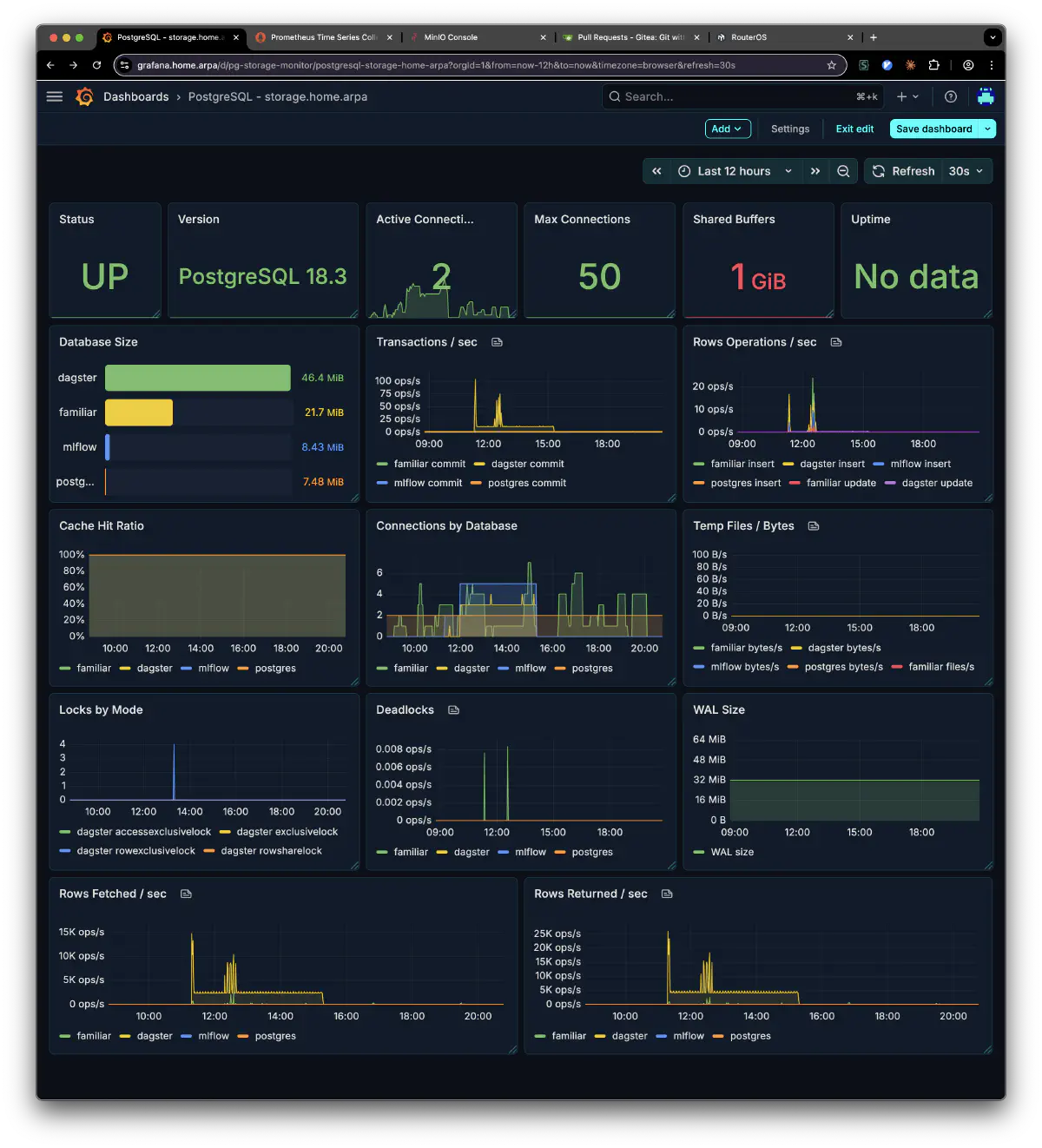
Here’s PostgreSQL after the migration. The familiar, dagster, mlflow, and postgres databases are all running on storage:
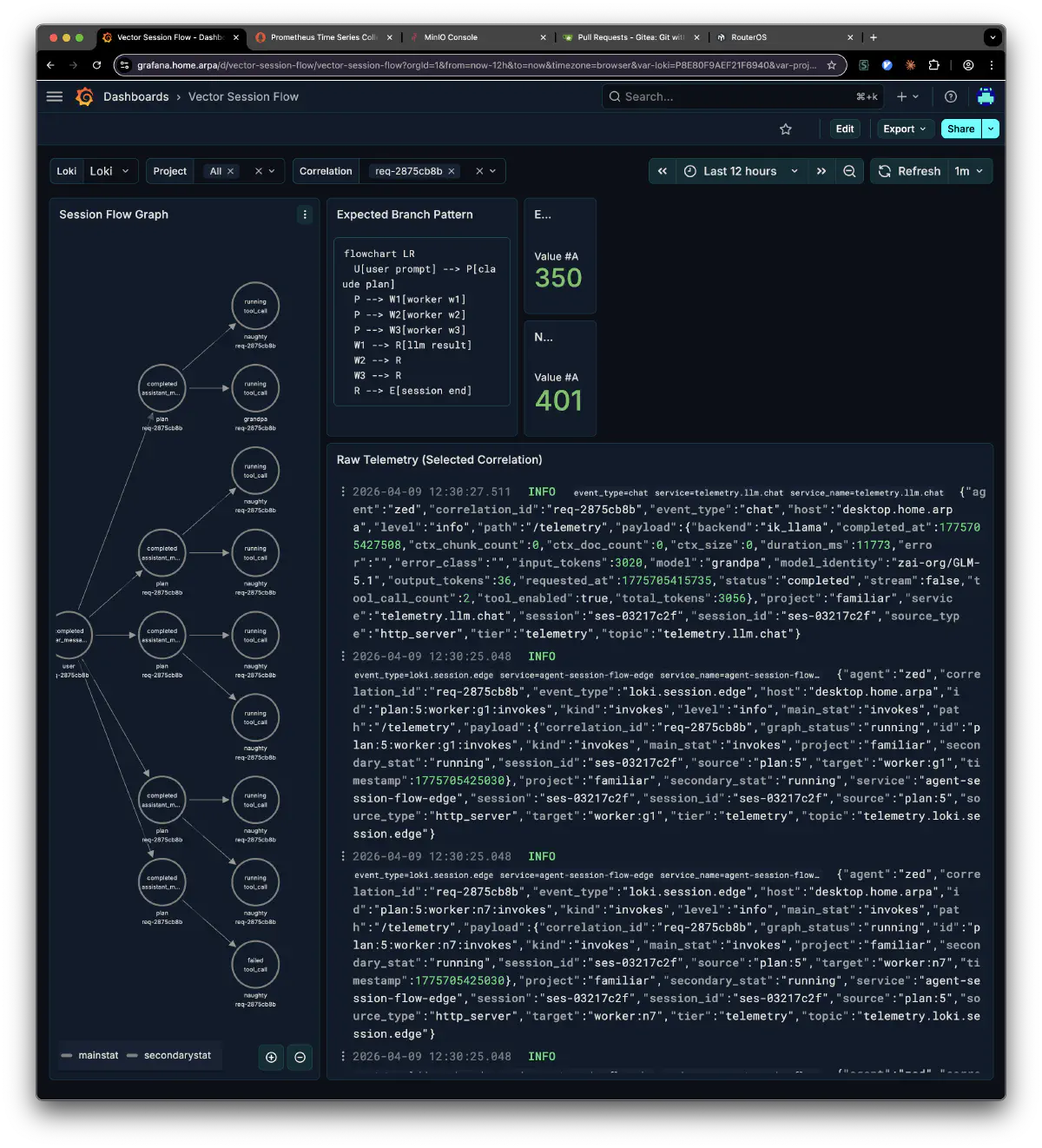
familiar’s session flow is now visible as telemetry too. You can trace a chain of requests by correlation_id:
storage also collects restic backups from each node. Most tools are written in Rust and Go; CPU and memory use caused no problems in the observed workload.
The server is a Mac Mini Late 2018 with 2TB storage, bought from Janpara for about 40,000 yen. SMART showed nearly zero Power-On Hours at purchase. I replaced the OS with ubuntu-minimal and run it 24/7.