Fine-tuning and quantizing Clef for order forms
A local LLM use case: LoRA fine-tuning and NVFP4 quantization with ModelOpt reduced Clef from 54.97 GB to 23.16 GB. Includes mock-form results, five training examples, and an operation video.
Terms
Definitions and references
| Field | Value |
|---|---|
| Clef / Jev-Omni | AI models that choose the next action from a screen. |
| Fine-tuning / LoRA | Training AI on task examples. LoRA adds a small set of trainable weights. |
| Quantization / NVFP4 | Using shorter number formats to reduce model size. NVFP4 is a four-bit format. |
| DSH (DeepSeek Harness) | The app that receives written instructions and operates the screen. |
| Qwen | An open-source AI model family developed by Alibaba. Here, Qwen handles instructions and Clef scores possible screen actions. |
| UTM | The virtual environment running macOS for these checks. |
| Screen information / DOM / AX | The roles, positions and values of controls. DOM supplies web-page information; AX supplies information from the operating system. |
| Backtest | Trying trading rules on past data to check their results. |
| BF16 / FP8 | Number formats using 16 bits and 8 bits respectively. |
| MLP / attention | Parts of an AI model. MLP transforms information; attention handles relationships between inputs. |
| OCO | Two linked order conditions. When one is filled, the other is cancelled. |
| IFD / IFDOCO | IFD places a second order after the first is filled. IFDOCO uses an OCO order for that second stage. |
| SOR | A system that compares prices across markets and selects where to send an order. |
References: Qwen · LoRA · NVFP4 · Order types · IFDOCO · SOR
Clef can score possible actions from screen information and an image. We supplied order conditions and checked whether it could enter those conditions on a mock form.
At loFT LLC, we evaluate local LLMs for AI integration into business systems. We fine-tuned Clef on action examples with LoRA and used NVIDIA Model Optimizer (ModelOpt) for NVFP4 quantization. We used mock order forms to test field verification and handoff to a person.
Weight size fell from 54.97 GB to 23.16 GB while retaining 337/337 correct decisions and 24/24 complete inputs with human handoff on the mock forms.
We also develop AI systems using omni models that handle images, sound, and video. Our work includes improving quality evaluation with images and evaluating sound. For video, we are developing input and evaluation methods that account for frame rates and frame sampling intervals. Our earlier Jev-Omni and Clef evaluation tested choices using inputs including images, audio, and video.
We use our own AI infrastructure for this development. We cover the full development process, including training data preparation, model fine-tuning and quantization, connections to existing systems, custom MCP development, proofs of concept, and native and web applications. We also welcome inquiries about local LLM deployment and evaluation system development.
Reading a screen and choosing an action
The AI receives the order conditions and screen information. Clef scores the possible actions, and the app enters the values. It reads the screen again after each action to check the result. It hands control to a person before password entry.
- Give the order conditions — Written instructions
- Read the screen — Text, positions and image
- Choose an action — Clef scores the options
- Check the values — Read the screen again
Training setup
We created the training data by combining fictional order conditions with mock screens. For each screen state, we prepared candidate actions and used rules to label the correct action. The examples include withholding input when conditions are incomplete and handing control to a person after input is complete.
LoRA trained the language layers; the image reader and action-scoring head stayed fixed. Clef and Jev-Omni were trained and quantized separately.
Results before and after reducing model size
The evaluated setup combined DOM screen information with an image. We evaluated 337 decisions and 30 order conditions on mock screens with the correct action included among the options. There were 24 valid conditions and six invalid or incomplete ones.
The six order types were limit, market, stop, OCO, IFD and IFDOCO. We counted individual correct decisions and complete input sequences separately.
| Clef version | Correct decisions | All fields correct and human handoff |
|---|---|---|
| Before fine-tuning (BF16) | No quantitative score | No quantitative score |
| After the first training run (BF16) | 322/337 (95.5%) | 16/24 (66.7%) |
| After the second training run (BF16) | 337/337 (100%) | 24/24 (100%) |
| After quantization (NVFP4) | 337/337 (100%) | 24/24 (100%) |
The first run was evaluated using screen information from saved records plus images; the second run and quantized version used browser DOM plus images. Both training and input format changed in this comparison. There is no quantitative score from before fine-tuning. At that stage, DSH session logs showed unsuccessful behavior, including runs stopping partway through.
In the quantized setup, the six invalid or incomplete conditions produced a decision to withhold input. All 30 records were complete. Attempts and actions beyond the stopping point both totalled zero.
The candidate lists include the correct action. Order and negative templates overlap between training and evaluation splits. Decisions within the same order are correlated, so 337 decisions are not 337 independent orders. These results do not establish performance on unseen screens.
Model size before and after quantization
| Configuration | Weight size | Share of original size |
|---|---|---|
| After the second training run (BF16) | 54.97 GB | 100% |
| After quantization (NVFP4, mixed precision) | 23.16 GB | 42.1% |
Weight size fell by 31.81 GB, a 57.9% reduction. At about 42% of the original size, the model retained 337/337 correct decisions and 24/24 complete inputs with human handoff in the mock-screen evaluation above.
Sizes are calculated from the saved tensor metadata, including the model and final decision head. One GB is one billion bytes. These sizes are not runtime VRAM usage.
Once the quantized Clef model was ready, we sent 336 requests one at a time. Median response time was 0.978 seconds. About 95% returned within 1.227 seconds. These are warm serial HTTP request times, not whole-order operation times or a speed comparison with BF16.
Detailed setup
For the second training run, we made two inputs from each example: screen information with an image, and an image-centred view. Their training weights were 50:50.
The smaller model uses NVFP4 for MLP, FP8 for attention, and BF16 for image reading and the final decision. The serving paths use different option numbers, so we compared the actions they represented.
Inference records
Training data examples
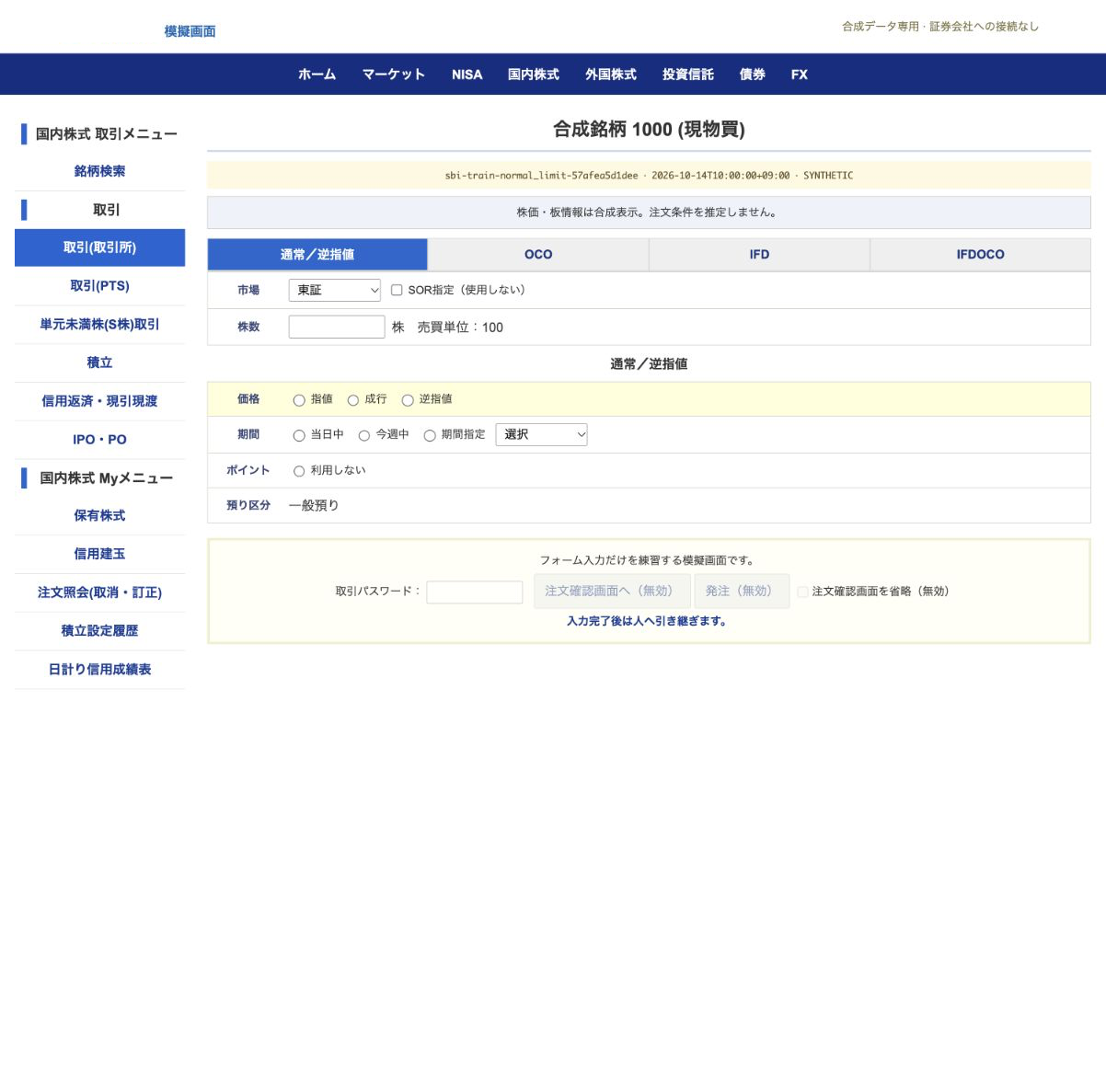
Five examples from the training split of “Order Form Training Data v3,” now managed by ML Foundry. Each pairs order conditions, a screen and possible actions with its training target.
All five use fictional order conditions and synthetic mock screens from order-forms-v3 / train. The training targets are labels for learning, not model predictions. The dataset name is a publication alias.
The broker name is covered in white in the published images. Image paths and SHA-256 values inside the JSON describe the original source images, not the published PNGs.
01. Enter the quantity
Input to the AI
| Field | Value |
|---|---|
| Order conditions, summarized | Buy 100 shares of fictional symbol 1000 at a limit of ¥1,200.50, valid today. Use no SOR or points. |
| Current screen | The normal order screen for the symbol is open. The symbol and market are set; quantity is empty. |
Possible actions
option_00: Set quantity to 100option_01: Set quantity to 200option_02: Hand control to a personoption_03: Hold without entering values
Training target · option_00
Set quantity to 100
  {
  "kind": "SET",
  "field": "input_quantity",
  "value": "100",
  "tab": "normal"
}
Source record: sbi-train-normal_limit-57afea5d1dee-step-04
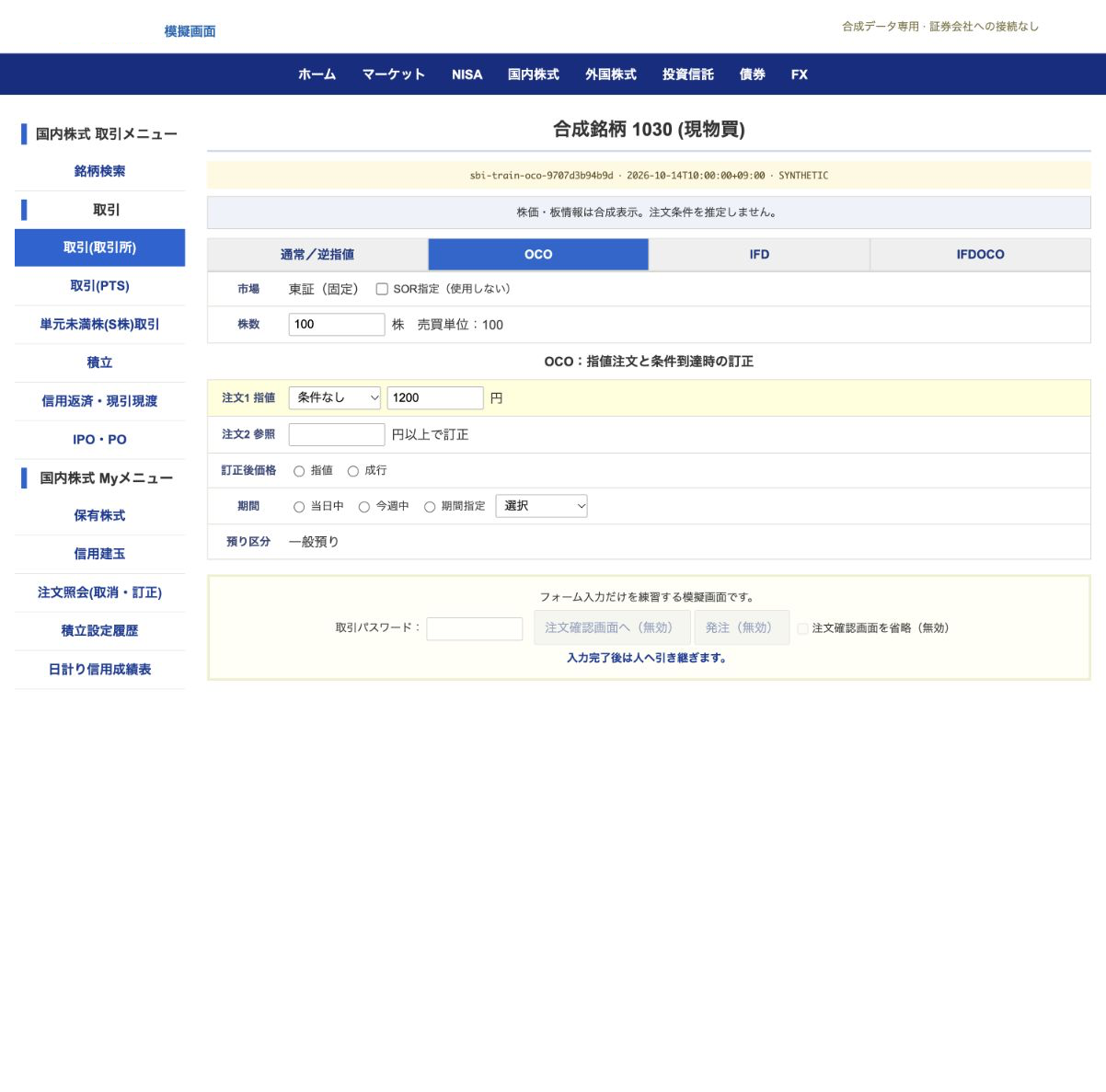
02. Enter the OCO trigger price
Input to the AI
| Field | Value |
|---|---|
| Order conditions, summarized | Buy 100 shares of fictional symbol 1030 at ¥1,200. At ¥1,220 or above, revise to a ¥1,230 limit. Both conditions are valid today. |
| Current screen | The OCO tab has quantity 100 and the first limit price of ¥1,200. The trigger price is still empty. |
Possible actions
option_00: Set quantity to 100option_01: Hand control to a personoption_02: Set OCO trigger price to 1220option_03: Hold without entering valuesoption_04: Set OCO trigger price to 1
Training target · option_02
Set OCO trigger price to 1220
  {
  "kind": "SET",
  "field": "oco2_input_trigger_price",
  "value": "1220",
  "tab": "oco"
}
Source record: sbi-train-oco-9707d3b94b9d-step-08
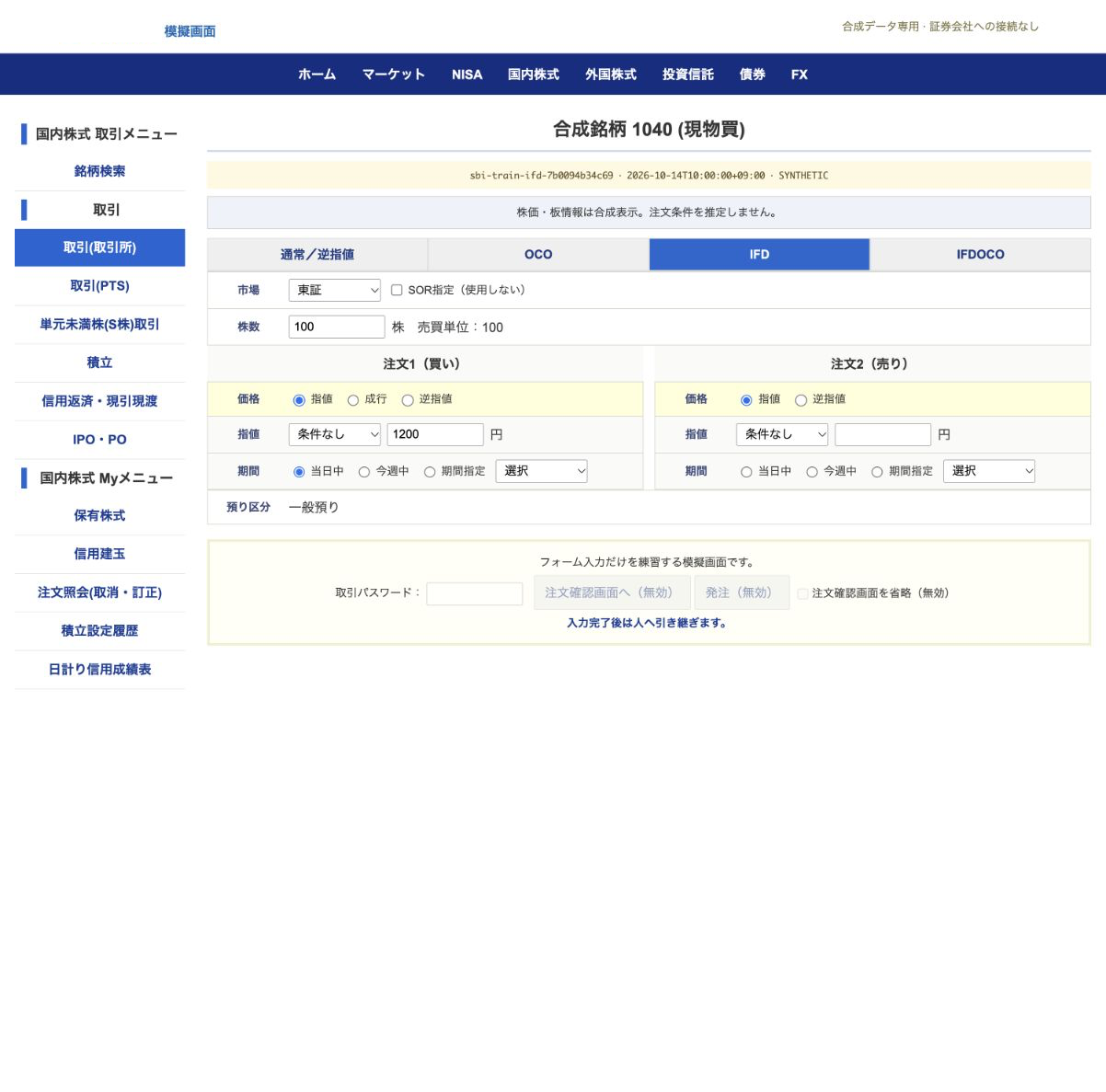
03. Enter the second IFD price
Input to the AI
| Field | Value |
|---|---|
| Order conditions, summarized | Buy 100 shares of fictional symbol 1040 at ¥1,200. After that order fills, sell at ¥1,250. Both orders are valid today. |
| Current screen | The IFD tab has the entry price of ¥1,200 and other prior fields set. The exit limit price is empty. |
Possible actions
option_00: Hand control to a personoption_01: Set quantity to 100option_02: Set IFD exit limit price to 1option_03: Set IFD exit limit price to 1250option_04: Hold without entering values
Training target · option_03
Set IFD exit limit price to 1250
  {
  "kind": "SET",
  "field": "done_input_price",
  "value": "1250",
  "tab": "ifd"
}
Source record: sbi-train-ifd-7b0094b34c69-step-12
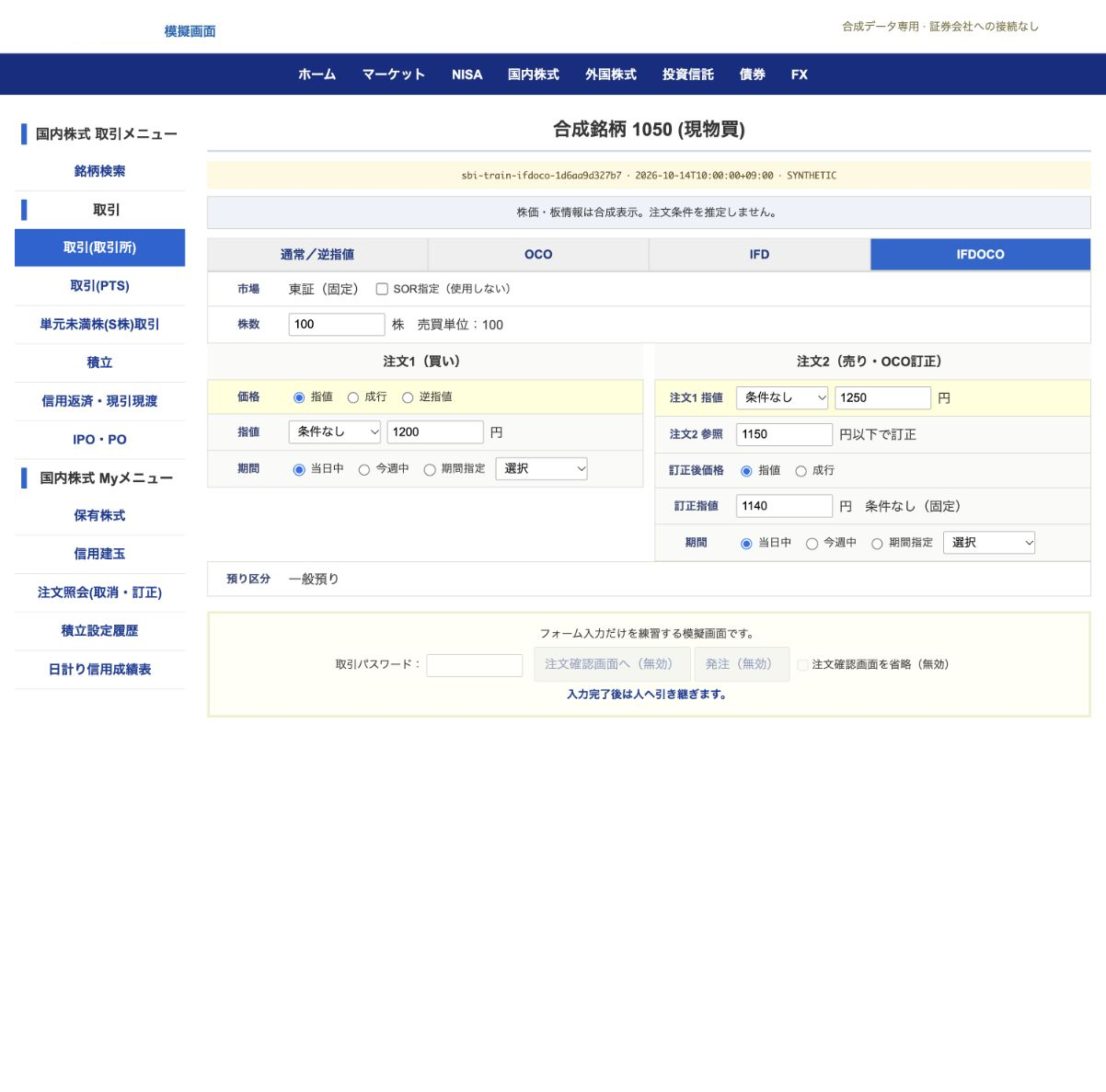
04. Hand control to a person
Input to the AI
| Field | Value |
|---|---|
| Order conditions, summarized | Buy 100 shares of fictional symbol 1050 at ¥1,200. Then sell at ¥1,250, or use a ¥1,140 limit if the price reaches ¥1,150 or below. Valid today. |
| Current screen | The IFDOCO fields are complete. Hand control to a person before password entry or order confirmation. |
Possible actions
option_00: Hold without entering valuesoption_01: Set quantity to 100option_02: Hand control to a person
Training target · option_02
Hand control to a person
  {
  "kind": "HANDOFF",
  "field": null,
  "value": null,
  "tab": "ifdoco"
}
Source record: sbi-train-ifdoco-1d6aa9d327b7-step-16
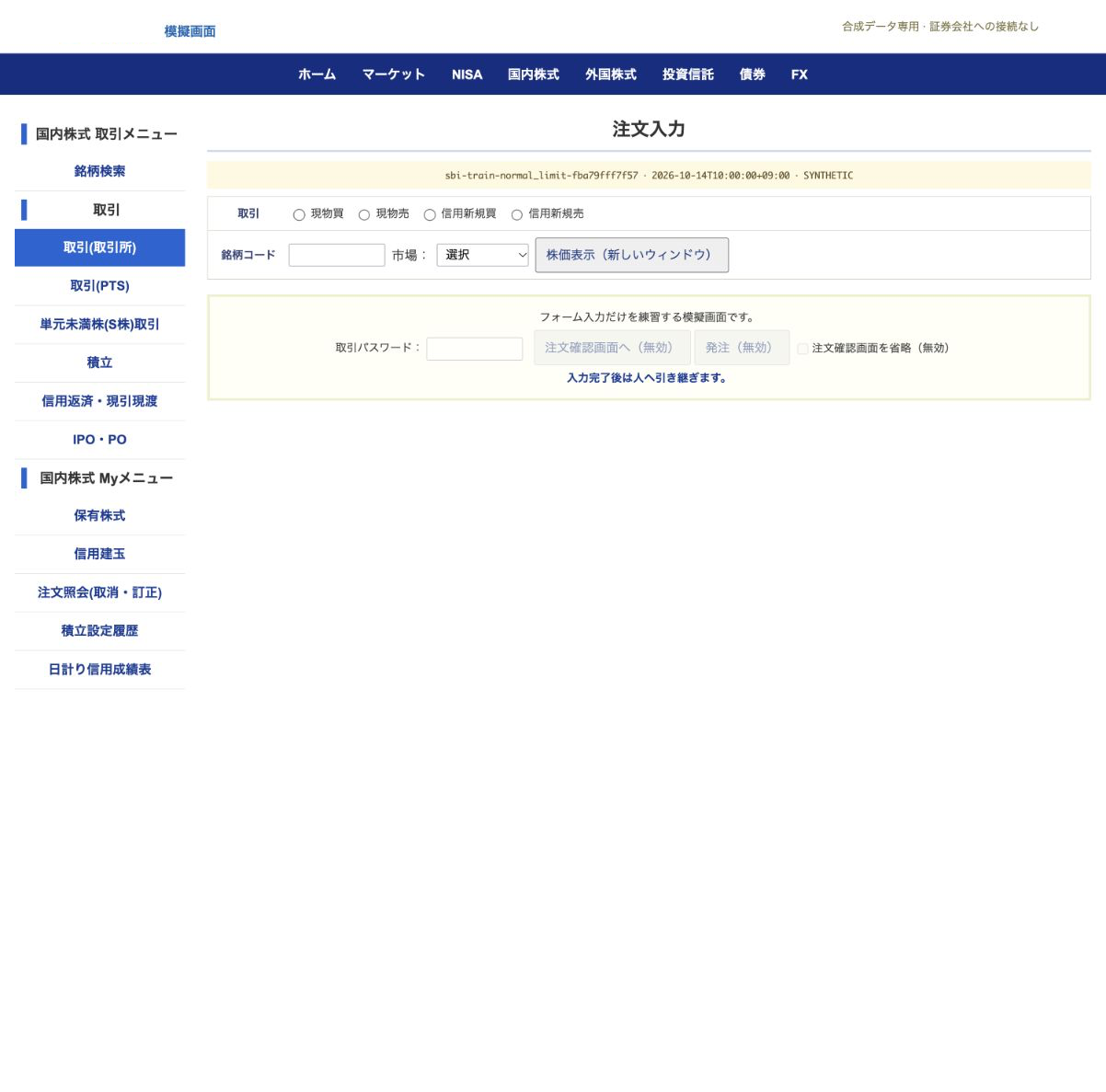
05. Hold when quantity is missing
Input to the AI
| Field | Value |
|---|---|
| Order conditions, summarized | Buy fictional symbol 1000 at a limit of ¥1,200.50, valid today. No share quantity is specified. |
| Current screen | The normal order screen is at its initial state. Missing quantity means input should not begin. |
Possible actions
option_00: Hold without entering valuesoption_01: Set symbol code to 9999option_02: Hand control to a person
Training target · option_00
Hold without entering values
  {
  "kind": "NO_ACTION",
  "field": null,
  "value": null,
  "tab": "normal"
}
Source record: sbi-train-normal_limit-fba79fff7f57-step-00
View the five source records as JSON
Filling the form as instructed
We gave DSH written order conditions and let it fill the mock form. A separate screen reading confirmed that each field matched the instructions in these two examples.
Normal order
Requested conditions
Buy fictional stock 0001 on the Tokyo exchange: 200 shares, limit price 1234.5 yen, valid for the day, no price condition, no SOR and no points.
A separate screen reading confirmed the values
| Field | Value |
|---|---|
| Stock and trade | 0001 / Tokyo exchange / cash buy |
| Quantity | 200 shares |
| Limit price | 1234.5 yen |
| Validity and condition | Day / no price condition |
| SOR and points | Unused |
OCO order
Requested conditions
Sell fictional stock 0004: 500 shares, limit price 3580 yen; at 3320 yen or below, revise to 3310 yen. Valid for the day, with no SOR.
A separate screen reading confirmed the values
| Field | Value |
|---|---|
| Stock and trade | 0004 / cash sell |
| Quantity | 500 shares |
| Initial limit | 3580 yen |
| Revision trigger | 3320 yen or below |
| Revised limit | 3310 yen |
| Validity and SOR | Day / no SOR |
After returning to the first conversation
A second conversation entered the OCO order. Returning to the first conversation reused the same form and changed only the quantity from 500 to 600 shares.
This check used 30 decisions and 29 input operations. It sent 59 image-backed requests to Clef.
Operation setup
Qwen Flash Next with low reasoning handled the request. Clef NVFP4 judged the screen actions. The browser and app routes used the same Brave browser.
The video shows a separate run recorded on 15 October. It starts with quantity 200 already entered and shows the limit price, day validity and points setting. The price-condition field still reads “Select”.
Operation video
Results with the other model
Adding form-term explanations to Jev-Omni BF16’s input increased correct decisions from 270/337 to 322/337. Completed input and human handoff rose from 2/24 to 18/24. A separate 18-case condition check changed from 10/18 to 9/18.
We compared quantization separately using the earlier model. BF16 gave 257 correct decisions out of 337; NVFP4 gave 250. We saved the converted model, loaded it again and checked that it ran.
Scope of the checks
The screen-operation environment used macOS in UTM. The app compares control roles, positions and values with the image, then operates the verified target.
As of 15 October, the sequence alternating five browser operations and five app operations remained under evaluation. The 337 decisions and 30 order conditions above do not validate this ten-case sequence or native AX operation. Live broker operation and order submission were outside the evaluation.
Operation environment
We tried Cua Spaces after using DSH with UTM, then returned to UTM. It made screen-information handling and the connection to the decision model easier to adjust locally.
Clef receives a diagnostic request when screen information is unavailable. Input permission is checked separately, and the app proceeds once it has verified the target.
Evaluation data
Saved results for Clef’s decisions and order-input evaluation.
Public files and sources · SHA-256
Related personal research
The following stock-data analysis is the founder’s personal research.
Comparing trading strategies: backtest
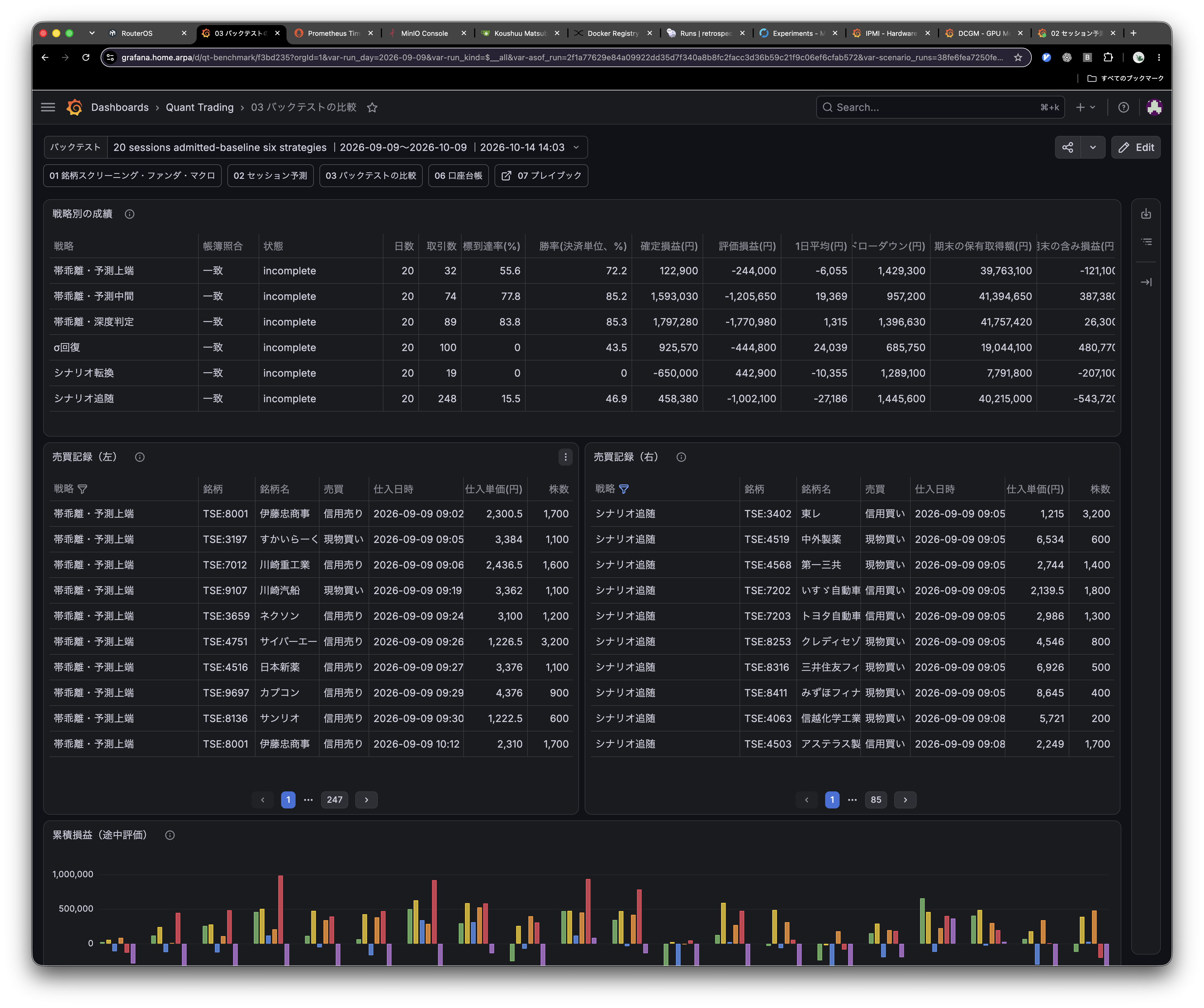
The image below shows interim backtest results comparing six trading strategies on historical stock prices. Performance, trade records and profit and loss appear together on one screen. These are simulated results, not realized live-trading returns.
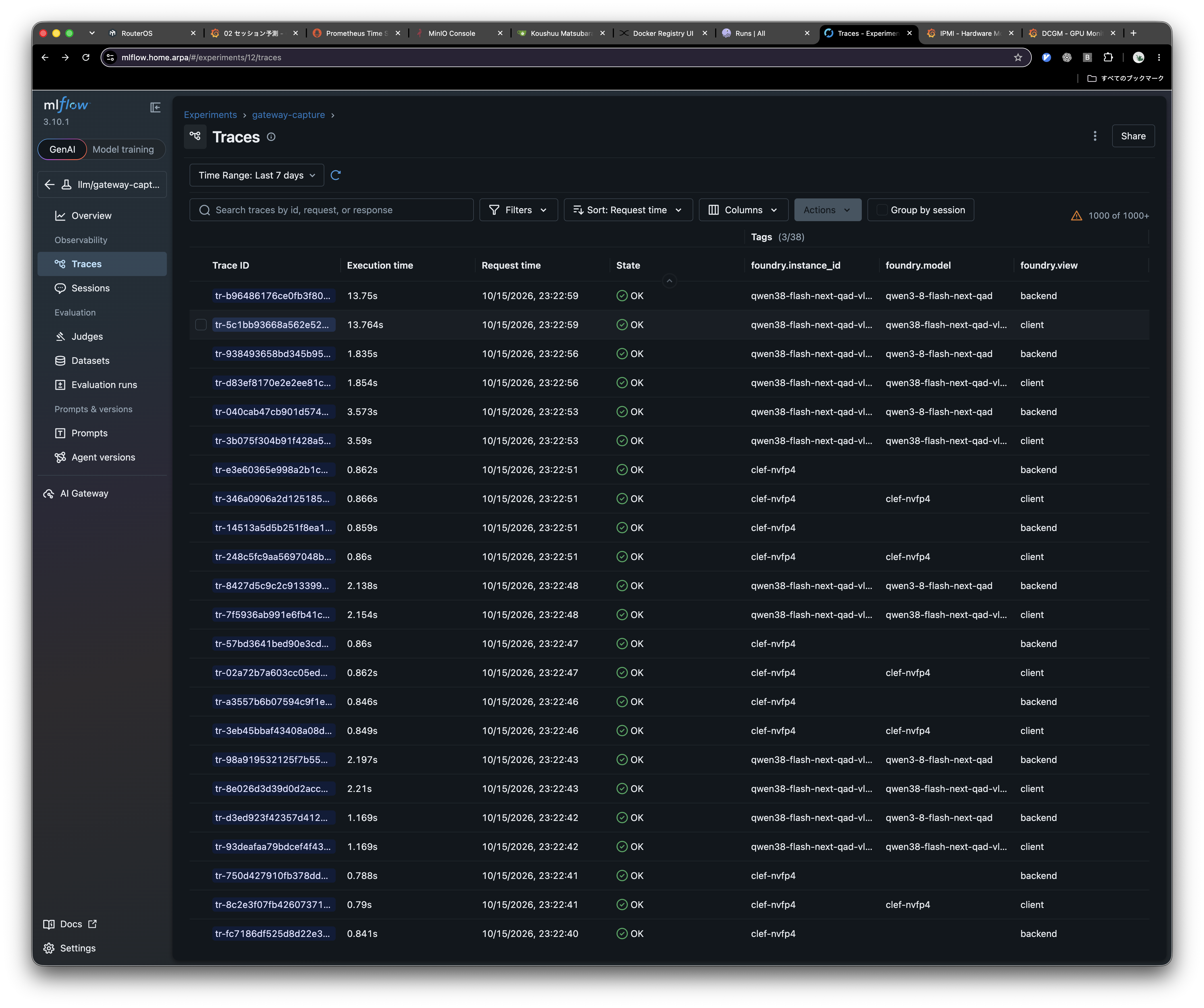
The system generates trade records every few minutes from stock prices received in real time. Input data and indicators stay resident on a workstation and are updated through hot loading. Analysis uses multiple methods and models, including LightGBM, CatBoost, Kumo-series, Chronos-2, and TimesFM.
In the planned automation, a Familia agent pulls the trade records and fills in and configures the order screen accordingly. A person then enters the password and presses the order submission button.
Operating the order screen, including input and settings, took about 50 seconds per order as of 15 October. The founder is considering fine-tuning Qwen3.8 to reduce this operation time further. The workflow is intended for trading styles other than scalping, with screen operation within one minute as a practical target.