
GLM-5.1 expert placement and generation speed
A CPU/GPU placement test that raised GLM-5.1 IQ3_KS to 21.75 t/s. For AI system development infrastructure, it covers Qwen3-Coder-Next VRAM sharing and distinguishes measured layouts from residency proposals.

I measured GLM-5.1 IQ3_KS for use as the familiar orchestrator and planned how to share VRAM with Qwen3-Coder-Next workers. The grandpa lane plans, reviews, and decides convergence, so its generation time affects each turn. Concurrent worker residency remains a proposal for parallel agents in AI system development.
Full --cpu-moe remained CPU-bound, with little benefit from two GPUs. -ot placement of head 12 and tail 10 layers across two GPUs improved 53.09ms/token to 45.98ms/token, or 18.84 t/s to 21.75 t/s. Real operation must also fit two Qwen3-Coder-Next Q4_0 --parallel 2 workers.
Measurements and resident layout
Key results:
| Topic | What seems settled |
|---|---|
| CPU bottleneck | CPU evaluation of expert FFNs accounts for roughly 45-50ms/token, or 85-90% of total time |
| Meaning of 2 GPUs | With full cpu-moe, 2 GPUs behave like 1 GPU, with 53.09 vs 53.03 ms/token |
| Real source of improvement | n-cpu-moe 64 gives +5.7%, while -ot head12+tail10 gives +15.3% |
| Hot layers | Head+tail over 22 layers works materially better than tail-only over 14 layers; head is clearly hot |
| Context resilience | TG stays near 53ms at 61t and around 54-55ms even at 4096t |
-ger | Improves CPU-side expert execution by 1-2%, plausibly via better L3 locality |
-sm graph | Unsupported on GLM-DSA and falls back to layer |
| thinking | Not worth it for orchestrator use. 61 content tokens plus 294 reasoning tokens turns 4.6s into 19.1s |
The fastest standalone layout had 22 head+tail layers. A resident-worker plan instead budgets around 20 GLM GPU expert layers while prioritizing Qwen3-Coder-Next quality and throughput.
Observations
CPU Is Dominant
- CPU evaluation of expert FFNs dominates total generation time at around
45-50ms/token - Startup logs show
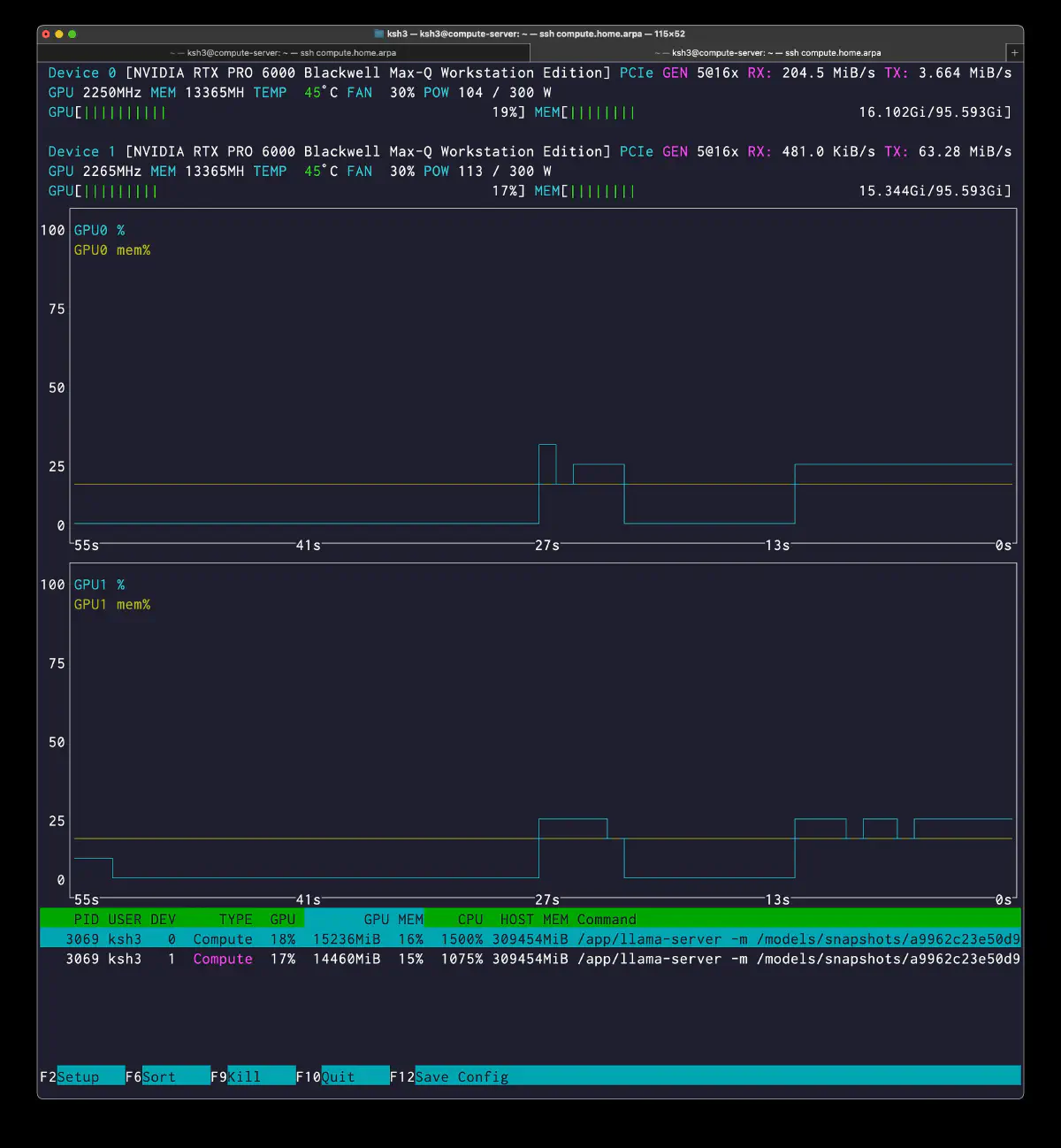
llm_load_tensors: offloaded 80/80 layers to GPU, so GPU layer compute itself is active - GPU utilization under full cpu-moe sits around
17-19% - PCIe transfer is not a controlling term. Activation size is about
12KB/layer, and even across 79 layers the transfer estimate is only around19μs - 2GPU layer-split is effectively meaningless in full cpu-moe mode. 1GPU and 2GPU are functionally equivalent in TG
The measurements indicate GPU waiting for CPU expert evaluation.
Expert Placement Improves TG
| Configuration | GPU expert layers | ms/token | TG (t/s) | Improvement |
|---|---|---|---|---|
| full cpu-moe (expert 0) | 0 | 53.0 | 18.8 | baseline |
| n-cpu-moe 64 | 14 | 50.2 | 19.9 | +5.7% |
-ot head12+tail10 | 22 | 46.0 | 21.8 | +15.3% |
Gains from head placement
- Tail-only over 14 layers improved TG by
+5.7% - Head 12 plus tail 10 improved TG by
+15.3% - The GPU-resident layer count only increased by
1.57x, but the gain grew by roughly2.5x, which strongly suggests denser activation on the head side
High Context Tolerance
- TG stays nearly flat from
61tto4096t - MLA compresses KV enough to keep
32k ctxaround1.5GB - Because CPU expert evaluation dominates, context growth has relatively little leverage over total decode time
-ger Has a Real Effect
- The gain is small but consistent:
50.55 -> 50.16 ms/token - Grouped expert routing appears to play slightly better with the large L3 cache on
EPYC 9175F
-sm graph Is Unsupported on GLM-DSA
- Even when explicitly requested, it falls back to
layer - On this model, split mode is not where the useful optimization work is
Thinking and elapsed time
- Adding
294reasoning tokens to an output that only needs61answer tokens turns4.6sinto19.1s --reasoning-budget 0orenable_thinking: falseshould be the default
Background
Role allocation:
| Role | Purpose | Model |
|---|---|---|
| grandpa | Orchestrator review, judgment, and contract consistency checks | GLM-5.1 IQ3_KS |
| naughty-worker | Code generation, edits, and file output | Qwen3-Coder-Next |
Workers prioritize coding quality; grandpa needs sufficient quality with low generation time. I measured GLM placement to balance the two.
Hardware
  GPU:  NVIDIA RTX PRO 6000 Blackwell Max-Q 96GB × 2
CPU:  AMD EPYC 9175F (16 cores)
RAM:  768GB DDR5 6400MT/s
Two GPUs provide capacity here more than bandwidth. Moving experts to GPU quickly exceeds single-card capacity.
GLM-5.1 Model Overview
Startup metadata:
  llm_load_print_meta: arch                 = glm-dsa
llm_load_print_meta: model type           = 744B.A40B
llm_load_print_meta: model ftype          = IQ3_KS - 3.1875 bpw
llm_load_print_meta: model params         = 753.864 B
llm_load_print_meta: model size           = 320.216 GiB (3.649 BPW)
llm_load_print_meta: n_layer              = 79
llm_load_print_meta: n_expert             = 256
llm_load_print_meta: n_expert_used        = 8
llm_load_print_meta: n_layer_dense_lead   = 3
Layer structure:
layer 0-2: denselayer 3-77: MoElayer 78: nextn predictionlayer 79: output
There are 75 MoE layers, with these expert sizes:
  gate_exps = 1225 MiB
down_exps = 1638 MiB
up_exps   = 1225 MiB
Each expert layer is around 4.1GB, totaling 307GB. CUDA_Host pinned allocation increases RAM use. GPU non-expert weights are 14.5GB, KV 1.5GB, and compute buffers 5.4GB.
Base Command
The ik_llama.cpp baseline command:
  podman run --rm \
  --device nvidia.com/gpu=1 \
  -p 8000:8000 \
  --cap-add=SYS_NICE \
  -v /mnt/data/models/models--ubergarm--GLM-5.1-GGUF:/models:ro,Z \
  registry.home.arpa/ik_llama.cpp:latest \
  -m /models/snapshots/.../IQ3_KS/GLM-5.1-IQ3_KS-00001-of-00008.gguf \
  --merge-qkv --ctx-size 32768 -ctk q8_0 -ctv q8_0 \
  --parallel 1 --threads 15 --threads-batch 24 \
  -b 8192 -ub 8192 -ngl 999 \
  --cpu-moe -muge -mla 3 -amb 512 \
  --jinja --host 0.0.0.0 --port 8000 \
  --warmup-batch --alias GLM-5.1
Main option meanings:
--cpu-moe: place all MoE expert weights in pinned CPU-side memory-muge: mergeffn_upandgate_exps-mla 3: MLA optimization level 3-amb 512: attention max batch size-ctk q8_0 -ctv q8_0: quantized KV cache
Method
Two requests compared TG:
- a short JSON generation request
- a long OpenAPI spec generation request
Short JSON represents review/contract replies; a long OpenAPI spec tests sustained output. I compared thinking on/off through timings.predicted_ms / predicted_n and llama.cpp eval time.
  # short-output test
curl -s -w "\n\nTotal time: %{time_total}s\n" \
 http://compute.home.arpa:8000/v1/chat/completions \
 -H "Content-Type: application/json" \
 -d '{
"model": "GLM-5.1",
"messages": [
{"role": "user", "content": "Write a JSON object with 5 fields describing a software project. Include name, language, version, description, and license."}
],
"max_tokens": 256,
"temperature": 0.7,
"top_p": 0.95,
"top_k": 45,
"min_p": 0.01,
"chat_template_kwargs": {"enable_thinking": false}
}'
  # long-output test
curl -s -w "\n\nTotal time: %{time_total}s\n" \
 http://compute.home.arpa:8000/v1/chat/completions \
 -H "Content-Type: application/json" \
 -d '{
"model": "GLM-5.1",
"messages": [
{"role": "user", "content": "Write a detailed OpenAPI 3.0 specification in JSON for a task management API. Include endpoints for CRUD operations on projects and tasks, with request/response schemas, error responses, and authentication via Bearer token."}
],
"max_tokens": 2048,
"temperature": 0.7,
"top_p": 0.95,
"top_k": 45,
"min_p": 0.01,
"chat_template_kwargs": {"enable_thinking": false}
}'
Evidence of CPU limits
I compared expert time with CPU and GPU utilization.
Expert Computation Is Almost Everything
- Baseline TG is around
53ms/token - Roughly
45-50ms/tokenof that appears to be CPU-side expert evaluation - Non-expert GPU-side work, KV, and compute account for the remainder
GPU stayed at 17-19% while CPU reached 1500%, consistent with the timing breakdown.
PCIe transfer estimate
The activation transfer estimate is:
- Activation size is about
12KB/layer - Even across all
79layers, transfer volume stays small - The transfer-time estimate is only around
19μs
Estimated transfer time is small compared with 53ms TG. CPU expert evaluation dominates.
Results across output lengths
TG stayed nearly flat at 61, 2048, and 4096 tokens. MLA keeps 32k ctx KV near 1.5GB, while CPU experts remain the bottleneck. This differs from dense or fully GPU-resident execution.
Configuration 1: Hybrid -ot exps=CPU, 2GPU layer-split
The first run placed all experts on CPU with -ot exps=CPU.
  podman run --rm \
  --device nvidia.com/gpu=all \
  -p 8000:8000 \
  --cap-add=SYS_NICE \
  -v /mnt/data/models/models--ubergarm--GLM-5.1-GGUF:/models:ro,Z \
  registry.home.arpa/ik_llama.cpp:latest \
  -m /models/snapshots/a9962c23e50d9c352e09fe0d9cb131026f4e6441/IQ3_KS/GLM-5.1-IQ3_KS-00001-of-00008.gguf \
  --merge-qkv --ctx-size 32768 -ctk q8_0 -ctv q8_0 --parallel 1 --threads 15 --threads-batch 24 -b 8192 -ub 8192 -ngl 99 -ot exps=CPU -muge -mla 3 -amb 512 -sm graph --jinja --host 0.0.0.0 --port 8000 --warmup-batch --alias GLM-5.1
Startup values:
  Split mode 'graph' is not supported for this model
  => changing split mode to 'layer'

llm_load_tensors:  CUDA_Host buffer size = 307110.47 MiB
llm_load_tensors:      CUDA0 buffer size =  7378.05 MiB
llm_load_tensors:      CUDA1 buffer size =  7120.90 MiB

llama_init_from_model: grouped er    = 0
llama_init_from_model: graph splits = 190
Baseline TG:
  # short output, thinking off
prompt eval time =    1323.95 ms /    30 tokens (   44.13 ms per token,    22.66 tokens per second)
       eval time =    3238.59 ms /    61 tokens (   53.09 ms per token,    18.84 tokens per second)

# long output, thinking off
prompt eval time =    1831.66 ms /    43 tokens (   42.60 ms per token,    23.48 tokens per second)
       eval time =  111609.04 ms /  2048 tokens (   54.50 ms per token,    18.35 tokens per second)

# long output, thinking on
prompt eval time =    2459.53 ms /    43 tokens (   57.20 ms per token,    17.48 tokens per second)
       eval time =  226282.06 ms /  4096 tokens (   55.24 ms per token,    18.10 tokens per second)
The nvtop view:
  PID USER DEV     TYPE  GPU        GPU MEM    CPU  HOST MEM
3069 ksh3   0  Compute  19%  15236MiB  16%  1500% 309454MiB
3069 ksh3   1  Compute  17%  14460MiB  15%  1075% 309454MiB
Configuration 2: Hybrid --cpu-moe, 2GPU
I repeated the two-GPU test with --cpu-moe to compare it with -ot exps=CPU.
  podman run --rm \
  --device nvidia.com/gpu=all \
  -p 8000:8000 \
  --cap-add=SYS_NICE \
  -v /mnt/data/models/models--ubergarm--GLM-5.1-GGUF:/models:ro,Z \
  registry.home.arpa/ik_llama.cpp:latest \
  -m /models/snapshots/a9962c23e50d9c352e09fe0d9cb131026f4e6441/IQ3_KS/GLM-5.1-IQ3_KS-00001-of-00008.gguf \
  --merge-qkv --ctx-size 32768 -ctk q8_0 -ctv q8_0 --parallel 1 --threads 15 --threads-batch 24 -b 8192 -ub 8192 -ngl 99 --cpu-moe -muge -mla 3 -amb 512 -sm graph --jinja --host 0.0.0.0 --port 8000 --warmup-batch --alias GLM-5.1 --temp 0.7 --top-k 45 --top-p 0.95 --min-p 0.01
The measured values matched.
  Split mode 'graph' is not supported for this model
  => changing split mode to 'layer'

llm_load_tensors:  CUDA_Host buffer size = 307110.47 MiB
llm_load_tensors:      CUDA0 buffer size =  7378.05 MiB
llm_load_tensors:      CUDA1 buffer size =  7120.90 MiB

llama_init_from_model: graph splits = 190
  # short output, thinking off
prompt eval time =    1323.95 ms /    30 tokens (   44.13 ms per token,    22.66 tokens per second)
       eval time =    3238.59 ms /    61 tokens (   53.09 ms per token,    18.84 tokens per second)

# long output, thinking off
prompt eval time =    1831.66 ms /    43 tokens (   42.60 ms per token,    23.48 tokens per second)
       eval time =  111609.04 ms /  2048 tokens (   54.50 ms per token,    18.35 tokens per second)
For this model and build, -ot exps=CPU and --cpu-moe had the same buffers and performance. Below, both are called full cpu-moe.
Configuration 3: Hybrid --cpu-moe, 1GPU
I tested dev1 alone to check two-GPU layer-split overhead.
  podman run --rm \
  --device nvidia.com/gpu=1 \
  -p 8000:8000 \
  --cap-add=SYS_NICE \
  -v /mnt/data/models/models--ubergarm--GLM-5.1-GGUF:/models:ro,Z \
  registry.home.arpa/ik_llama.cpp:latest \
  -m /models/snapshots/a9962c23e50d9c352e09fe0d9cb131026f4e6441/IQ3_KS/GLM-5.1-IQ3_KS-00001-of-00008.gguf \
  --merge-qkv --ctx-size 32768 -ctk q8_0 -ctv q8_0 --parallel 1 --threads 15 --threads-batch 24 -b 8192 -ub 8192 -ngl 999 --cpu-moe -muge -mla 3 -amb 512 --jinja --host 0.0.0.0 --port 8000 --warmup-batch --alias GLM-5.1 --temp 0.7 --top-k 45 --top-p 0.95 --min-p 0.01
Single-GPU startup values:
  llm_load_tensors:  CUDA_Host buffer size = 307110.47 MiB
llm_load_tensors:      CUDA0 buffer size = 14498.95 MiB

llama_kv_cache_init:      CUDA0 KV buffer size = 1491.79 MiB
llama_init_from_model:    CUDA0 compute buffer size = 5418.03 MiB
llama_init_from_model: graph splits = 152

Allocating 299.91 GiB of pinned host memory
done allocating 299.91 GiB in 46485.7 ms
Performance changed little.
  # short output, thinking off
prompt eval time =    1297.67 ms /    30 tokens (   43.26 ms per token,    23.12 tokens per second)
       eval time =    3340.94 ms /    63 tokens (   53.03 ms per token,    18.86 tokens per second)

# long output, thinking off
prompt eval time =    1823.10 ms /    43 tokens (   42.40 ms per token,    23.59 tokens per second)
       eval time =  110967.85 ms /  2048 tokens (   54.18 ms per token,    18.46 tokens per second)

# long output, thinking on
prompt eval time =    1696.37 ms /    43 tokens (   39.45 ms per token,    25.35 tokens per second)
       eval time =  222410.35 ms /  4096 tokens (   54.30 ms per token,    18.42 tokens per second)
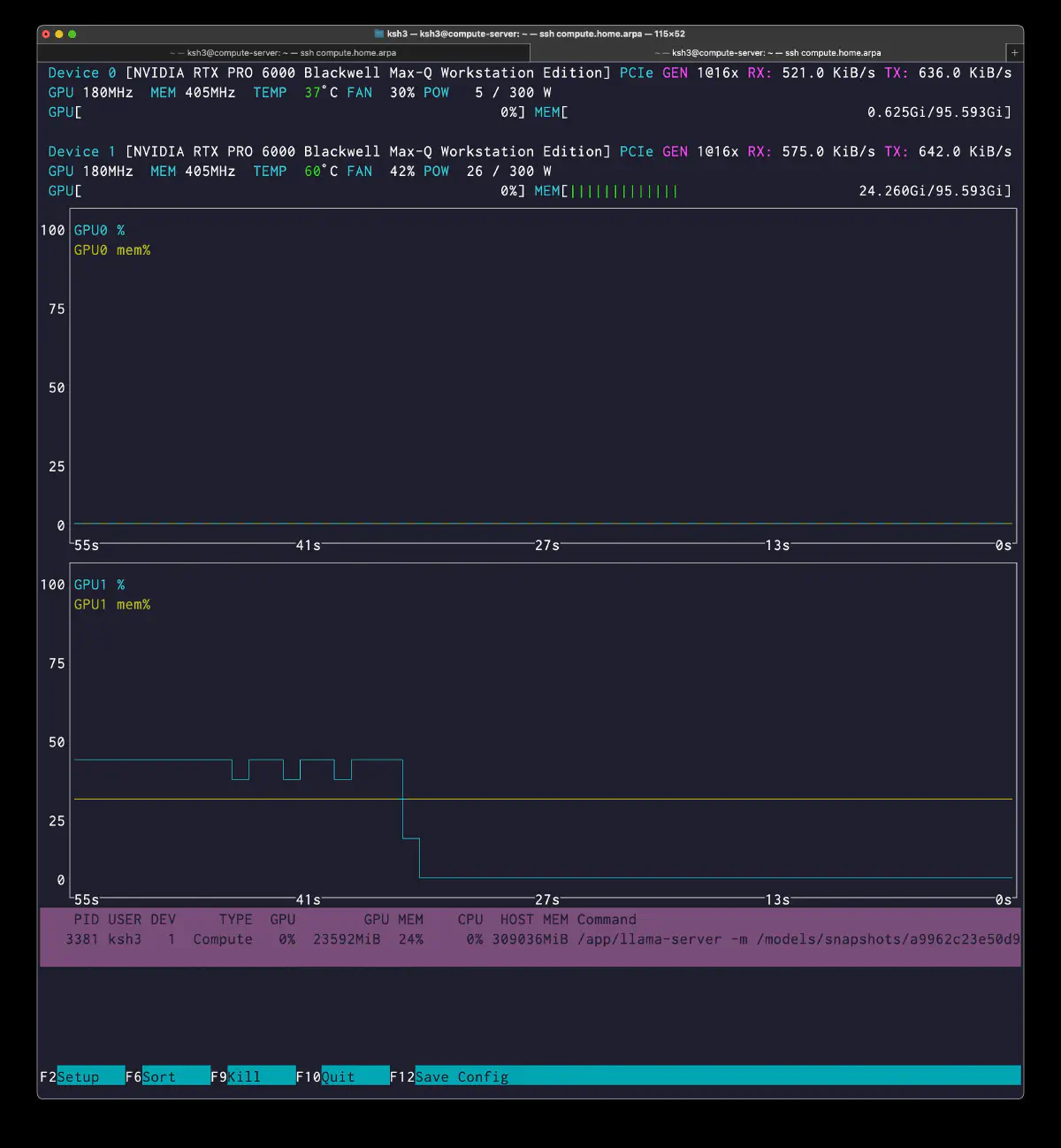
  PID USER DEV     TYPE  GPU        GPU MEM    CPU  HOST MEM
3381 ksh3   1  Compute   0%  23592MiB  24%     0% 309036MiB
Two observations:
graph splitsdrops from190to152, so the 1GPU graph is structurally simpler- TG remains almost unchanged, meaning CPU expert evaluation is still the real bottleneck
TG was effectively unchanged, allowing dev0 to be freed for workers.
Configuration 4: Hybrid --n-cpu-moe 64, 1GPU, -ger
--n-cpu-moe 64 leaves early experts on CPU and moves later ones to GPU.
  podman run --rm \
  --device nvidia.com/gpu=1 \
  -p 8000:8000 \
  --cap-add=SYS_NICE \
  -v /mnt/data/models/models--ubergarm--GLM-5.1-GGUF:/models:ro,Z \
  registry.home.arpa/ik_llama.cpp:latest \
  -m /models/snapshots/a9962c23e50d9c352e09fe0d9cb131026f4e6441/IQ3_KS/GLM-5.1-IQ3_KS-00001-of-00008.gguf \
  --merge-qkv --ctx-size 32768 -ctk q8_0 -ctv q8_0 --parallel 1 --threads 15 --threads-batch 24 -b 8192 -ub 8192 -ngl 999 --n-cpu-moe 64 -muge -mla 3 -amb 512 --jinja --host 0.0.0.0 --port 8000 --warmup-batch -ger --alias GLM-5.1 --temp 0.7 --top-k 45 --top-p 0.95 --min-p 0.01
Placement:
blk.3-63: CPU-sideblk.64-77: GPU-side- in practice, tail 14 MoE layers returned to GPU
Allocating 244.02 GiB of pinned host memory
TG improved.
  # short output, thinking off
prompt eval time =    1173.39 ms /    30 tokens (   39.11 ms per token,    25.57 tokens per second)
       eval time =    3109.75 ms /    62 tokens (   50.16 ms per token,    19.94 tokens per second)

# long output, thinking off
prompt eval time =    1690.07 ms /    43 tokens (   39.30 ms per token,    25.44 tokens per second)
       eval time =  103526.50 ms /  2048 tokens (   50.55 ms per token,    19.78 tokens per second)

# long output, thinking on
prompt eval time =    1664.97 ms /    43 tokens (   38.72 ms per token,    25.83 tokens per second)
       eval time =  207284.39 ms /  4096 tokens (   50.61 ms per token,    19.76 tokens per second)
nvtop shows increased GPU utilization and VRAM.
  PID USER DEV     TYPE  GPU        GPU MEM    CPU  HOST MEM
4153 ksh3   1  Compute  41%  80804MiB  83%  1432% 251746MiB
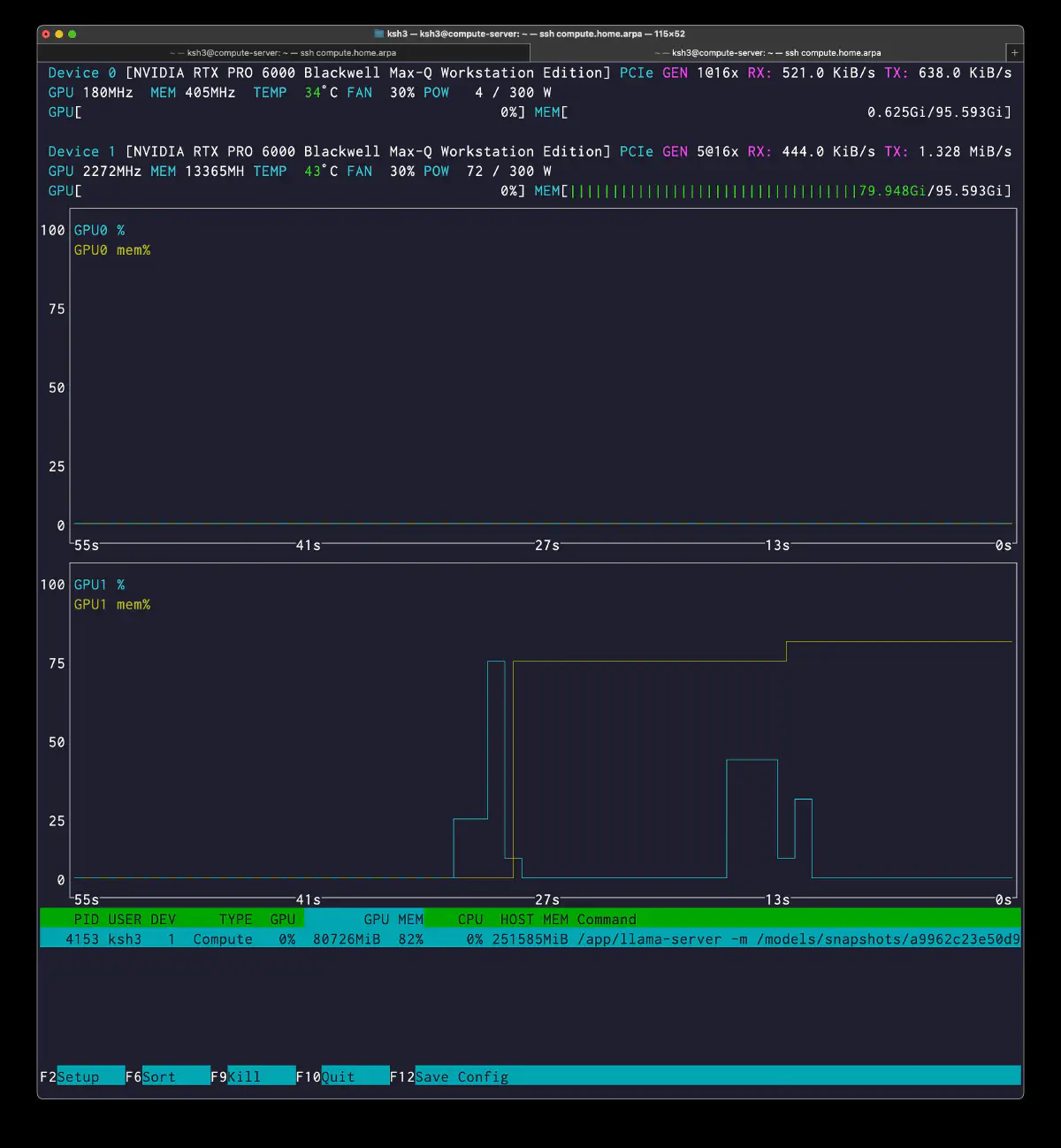
The gain was +5.7%.
Failure Case: Hybrid --n-cpu-moe 58, 1GPU -> OOM
--n-cpu-moe 58, targeting around 20 expert layers on one GPU, failed with OOM.
  podman run --rm \
  --device nvidia.com/gpu=1 \
  -p 8000:8000 \
  --cap-add=SYS_NICE \
  -v /mnt/data/models/models--ubergarm--GLM-5.1-GGUF:/models:ro,Z \
  registry.home.arpa/ik_llama.cpp:latest \
  -m /models/snapshots/a9962c23e50d9c352e09fe0d9cb131026f4e6441/IQ3_KS/GLM-5.1-IQ3_KS-00001-of-00008.gguf \
  --merge-qkv --ctx-size 32768 -ctk q8_0 -ctv q8_0 --parallel 1 --threads 15 --threads-batch 24 -b 8192 -ub 8192 -ngl 999 --n-cpu-moe 58 -muge -mla 3 -amb 512 --jinja --host 0.0.0.0 --port 8000 --warmup-batch -ger --alias GLM-5.1 --temp 0.7 --top-k 45 --top-p 0.95 --min-p 0.01
  ggml_backend_cuda_buffer_type_alloc_buffer: allocating 5418.03 MiB on device 0: cudaMalloc failed: out of memory
ggml_gallocr_reserve_n: failed to allocate CUDA0 buffer of size 5681217536
llama_init_from_model: failed to allocate compute buffers
About 20 layers do not fit on 96GB once non-expert weights, KV, and compute buffers are included.
Configuration 5: Hybrid -ot head12+tail10, 2GPU, -ger
The best result explicitly placed head and tail on separate GPUs.
  OT_ARGS=""
for i in $(seq 3 14); do
  OT_ARGS="$OT_ARGS -ot blk.$i.ffn_gate_exps=CUDA0"
  OT_ARGS="$OT_ARGS -ot blk.$i.ffn_down_exps=CUDA0"
  OT_ARGS="$OT_ARGS -ot blk.$i.ffn_up_exps=CUDA0"
done
for i in $(seq 68 77); do
  OT_ARGS="$OT_ARGS -ot blk.$i.ffn_gate_exps=CUDA1"
  OT_ARGS="$OT_ARGS -ot blk.$i.ffn_down_exps=CUDA1"
  OT_ARGS="$OT_ARGS -ot blk.$i.ffn_up_exps=CUDA1"
done

podman run --rm \
  --device nvidia.com/gpu=all \
  -p 8000:8000 \
  --cap-add=SYS_NICE \
  -v /mnt/data/models/models--ubergarm--GLM-5.1-GGUF:/models:ro,Z \
  registry.home.arpa/ik_llama.cpp:latest \
  -m /models/snapshots/a9962c23e50d9c352e09fe0d9cb131026f4e6441/IQ3_KS/GLM-5.1-IQ3_KS-00001-of-00008.gguf \
  --merge-qkv --ctx-size 32768 -ctk q8_0 -ctv q8_0 \
  --parallel 1 --threads 15 --threads-batch 24 \
  -b 8192 -ub 8192 -ngl 999 \
  --cpu-moe $OT_ARGS -ger \
  -muge -mla 3 -amb 512 \
  --jinja --host 0.0.0.0 --port 8000 \
  --warmup-batch --alias GLM-5.1
Startup values:
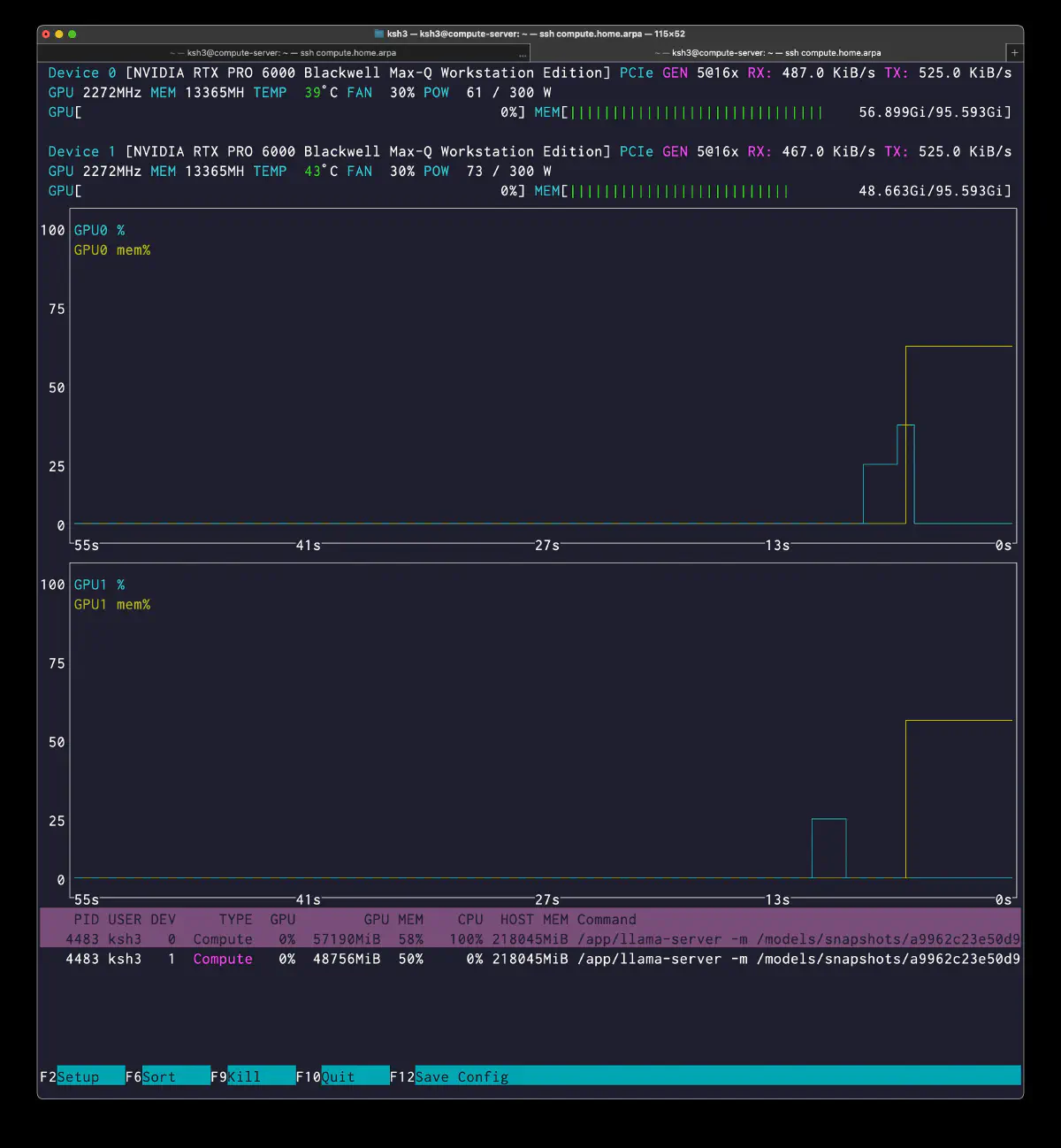
  Allocating 218045 MiB of pinned host memory

GPU0: 57190MiB (58%)
GPU1: 48756MiB (50%)
Placement:
- GPU0: head 12 expert layers + earlier attention
- GPU1: tail 10 expert layers + later attention
- CPU: the middle 53 expert layers
The best PP/TG in this run:
  # short output, thinking off
prompt eval time =    1111.85 ms /    30 tokens (   37.06 ms per token,    26.98 tokens per second)
       eval time =    2942.51 ms /    64 tokens (   45.98 ms per token,    21.75 tokens per second)

# long output, thinking off
prompt eval time =    2016.80 ms /    43 tokens (   46.90 ms per token,    21.32 tokens per second)
       eval time =   94650.69 ms /  2048 tokens (   46.22 ms per token,    21.64 tokens per second)

# long output, thinking on
prompt eval time =    1431.92 ms /    43 tokens (   33.30 ms per token,    30.03 tokens per second)
       eval time =  190089.65 ms /  4096 tokens (   46.41 ms per token,    21.55 tokens per second)
nvtop also shows slightly reduced CPU pressure.
  PID USER DEV     TYPE  GPU        GPU MEM    CPU  HOST MEM
4483 ksh3   0  Compute  24%  64268MiB  66%  1355% 219523MiB
4483 ksh3   1  Compute  22%  55322MiB  57%  1194% 219523MiB
Grafana Monitoring
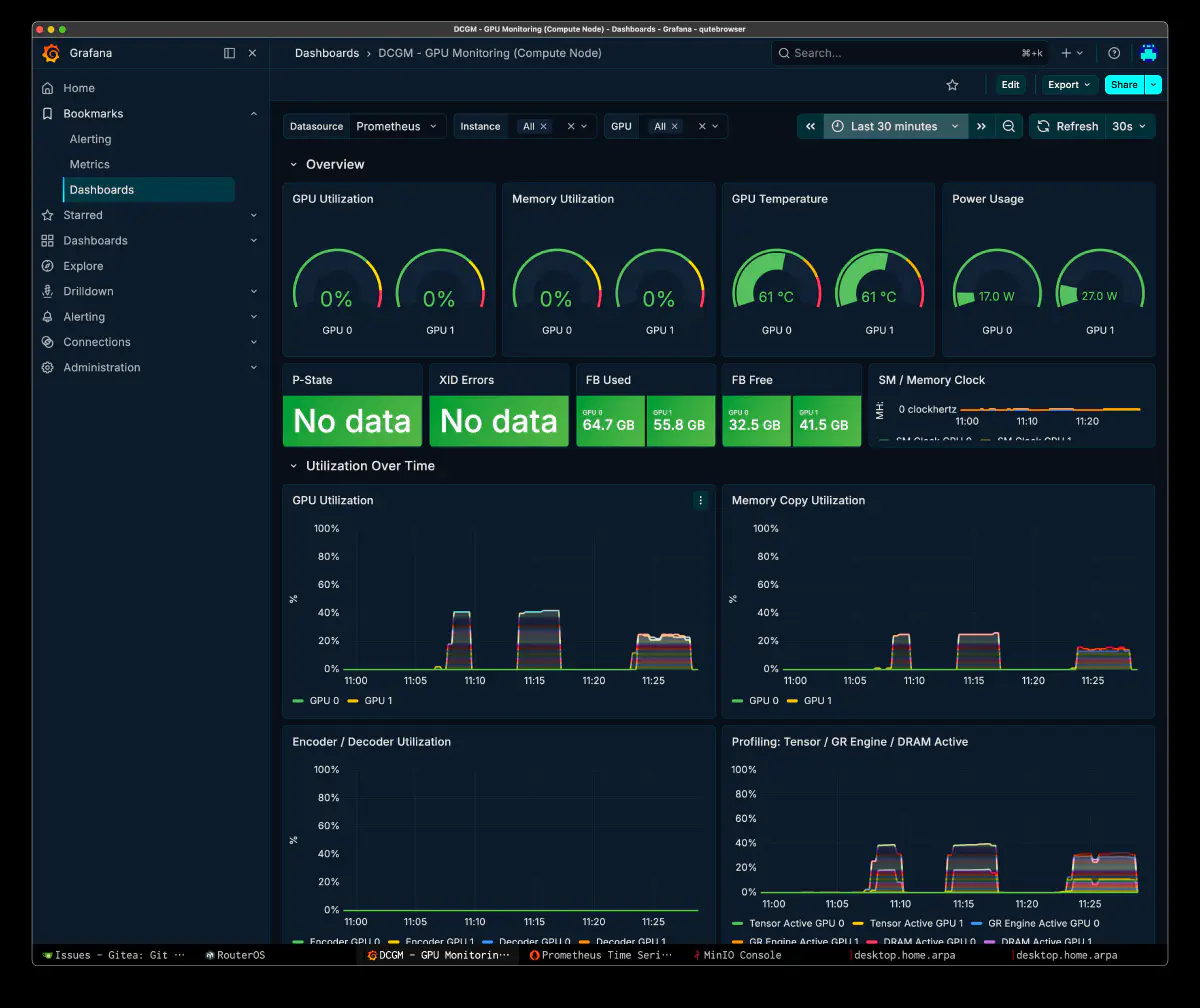
DCGM exporter tracked GPU utilization, memory copy, temperature, and power.
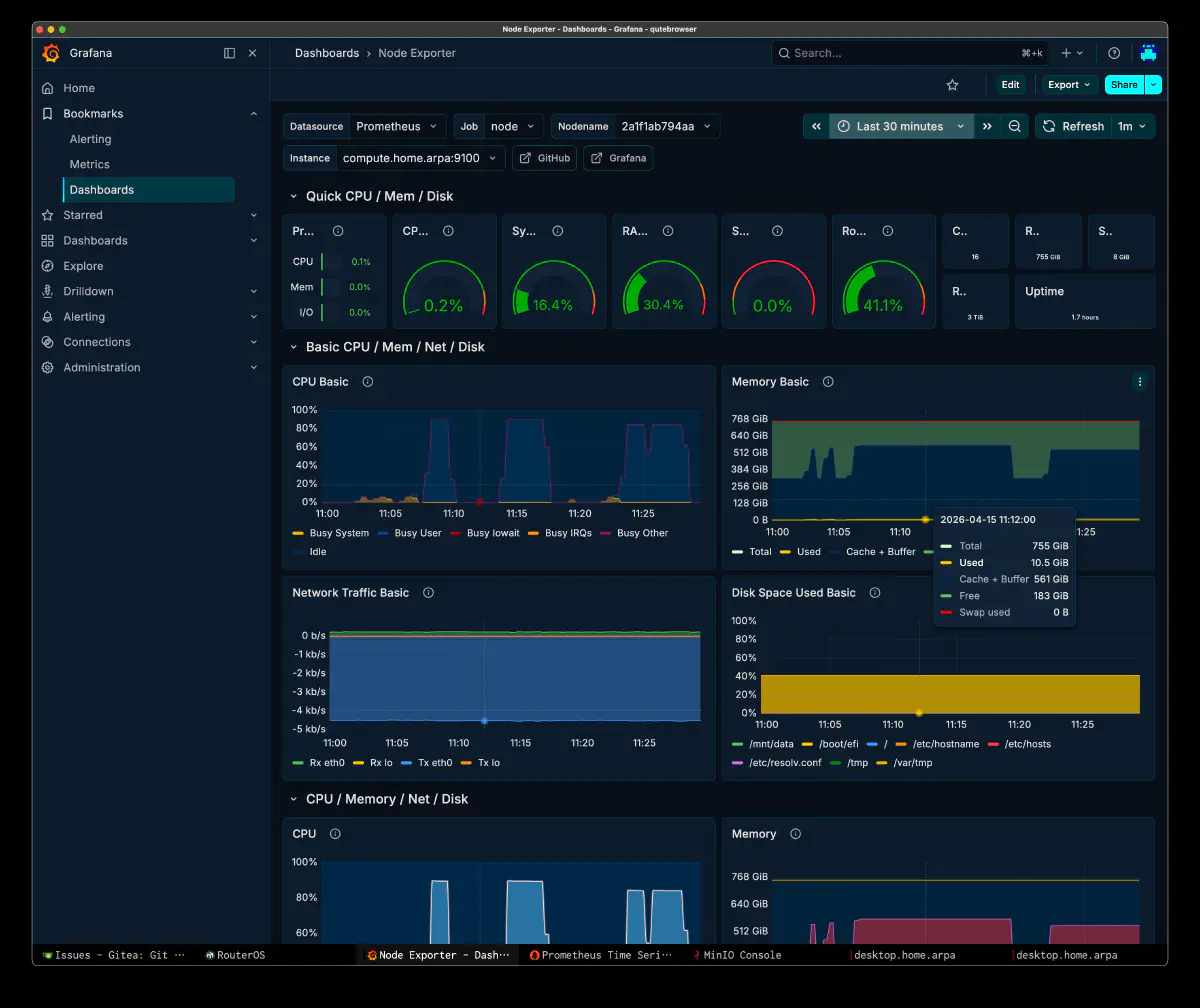
Node Exporter tracked CPU Busy User and memory.
Benchmark Summary
TG (eval)
| # | Configuration | GPUs | GPU expert layers | Short TG | 2048t TG | 4096t TG | Improvement |
|---|---|---|---|---|---|---|---|
| 1 | hybrid -ot exps=CPU | 2 | 0 | 18.84 | 18.35 | 18.10 | baseline |
| 2 | hybrid --cpu-moe | 2 | 0 | 18.84 | 18.35 | 18.10 | ±0% |
| 3 | hybrid --cpu-moe | 1 | 0 | 18.86 | 18.46 | 18.42 | +0.1% |
| 4 | hybrid --n-cpu-moe 64 -ger | 1 | 14 (tail) | 19.94 | 19.78 | 19.76 | +5.8% |
| 5 | hybrid -ot head+tail -ger | 2 | 22 (h12+t10) | 21.75 | 21.64 | 21.55 | +15.4% |
PP (prompt eval)
| # | Configuration | Short PP | Long PP | Best PP |
|---|---|---|---|---|
| 1 | hybrid -ot exps=CPU 2GPU | 22.66 | 23.48 | 23.48 |
| 3 | hybrid --cpu-moe 1GPU | 23.12 | 23.59 | 25.35 |
| 4 | hybrid --n-cpu-moe 64 -ger | 25.57 | 25.44 | 25.83 |
| 5 | hybrid -ot head+tail -ger | 26.98 | 21.32 | 30.03 |
GPU Resource Comparison
| # | Configuration | VRAM dev0 | VRAM dev1 | GPU util | CPU% | pinned RAM |
|---|---|---|---|---|---|---|
| 1 | hybrid exps=CPU 2GPU | 15236MiB | 14460MiB | 17-19% | 1500% | 300GB |
| 3 | hybrid cpu-moe 1GPU | — | 23592MiB | 17-19% | 1500% | 300GB |
| 4 | hybrid n-cpu-moe 64 | — | 80804MiB | 41% | 1432% | 244GB |
| 5 | hybrid -ot head+tail | 57190MiB | 48756MiB | 22-24% x 2 | 1355% | 218GB |
Improvement Summary
  hybrid full cpu-moe (baseline):    18.84 tok/s
hybrid cpu-moe 1GPU:               18.86 tok/s  (+0.1%)
hybrid n-cpu-moe 64 -ger:          19.94 tok/s  (+5.8%)
hybrid -ot head12+tail10 -ger:     21.75 tok/s  (+15.4%)
Analysis
CPU expert evaluation time
The 16-core EPYC 9175F evaluates 8 active out of 256 experts per token. With 85-90% of TG on CPU, adding GPUs alone does little.
Head and tail placement
Head+tail gained more than tail-only, suggesting denser head activation. Layer count also changed; frequency profiling remains a next step.
The Value of 2 GPUs Is Capacity
Expert and Qwen3-Coder-Next residency compete for VRAM. Two 96GB cards provide capacity beyond the full cpu-moe case.
Thinking Is a Bad Trade Here
Thinking mostly increases output tokens rather than changing TG. For short judgments and instructions, I plan to disable it to avoid the extra time. Its effect on convergence remains to be checked in Phase 0.
-ger Is Small but Real
Even 1-2% accumulates across hundreds of reviews. With most experts still on CPU, -ger remains a candidate for L3 locality improvement.
Final Direction with Qwen3-Coder-Next Included
The next layout includes two resident naughty-workers.
Qwen3-Coder-Next KV Efficiency
Qwen3-Coder-Next has a small KV footprint.
  48 layers: 36 DeltaNet (no KV cache) + 12 Gated Attention (KV heads=2)
256k ctx: KV ~3GB
1M ctx (YaRN): KV ~11GB
This helps keep long-context workers resident.
--parallel Strategy for Naughty
| parallel | per-slot ctx | Practicality for coding |
|---|---|---|
| 1 | 256k | Comfortable, but lower throughput |
| 2 | 128k | Practical baseline |
| 3 | 85k | Heavy tasks start to overflow |
| 4 | 64k | Too tight for agentic coding |
--parallel 2 is the practical minimum, prioritizing 128k x 2 throughput. YaRN extensions remain a later option.
Quant Choice: Q4_0 for Qwen3-Coder-Next
| Quant | PPL | weights | grandpa expert budget |
|---|---|---|---|
IQ4_KSS | 8.31 | 39 GiB | 48GB/GPU |
Q4_0 | 8.25 | 45 GiB | 42GB/GPU |
The PPL gap is 0.06, but I favored worker code quality. The cost is 2-3 GLM expert layers, around one second per 1000 tokens.
Final Layout
  dev0 (96GB):
  naughty-worker0: Q4_0, --parallel 2, 128k x 2
    weights 45GB + KV ~5.5GB + compute ~3GB = ~54GB
  grandpa expert (head side): ~42GB -> 10 layers

dev1 (96GB):
  naughty-worker1: Q4_0, --parallel 2, 128k x 2
    weights 45GB + KV ~5.5GB + compute ~3GB = ~54GB
  grandpa expert (tail+mid side): ~42GB -> 10 layers

grandpa non-expert/KV/compute: ~12GB/GPU (layer-split)
grandpa expert total: ~84GB -> 20 layers
CPU (768GB RAM): remaining 55 expert layers (~225GB pinned)
The target is ~47ms/token, or 21+ t/s, while retaining two workers. It is a proposal, slightly below the measured 22-layer 46ms result.
Expert Placement Plan (20 Layers)
  GPU0 (head-heavy):
  blk.3,4,5,6,7,8,9,10 + blk.20,30 = 10 layers

GPU1 (tail-heavy):
  blk.70,71,72,73,74,75,76,77 + blk.50,60 = 10 layers
The proposed 20 layers are eight head, eight tail, and four middle. Whether this approaches the 22-layer result still needs testing.
Operational Impact on the Orchestrator
Estimated review time for 1000 tokens:
| Configuration | Time required |
|---|---|
| cpu-moe baseline (18.8 t/s) | 53s |
| n-cpu-moe 64 (19.9 t/s) | 50s |
-ot head+tail (21.6 t/s) | 46s |
Seven seconds compounds over two or three rounds. The 22-layer layout also leaves less room for workers. Phase 0 must measure whether grandpa speed or naughty throughput improves convergence more.
Future Optimization Options
Custom GGUF Build
Raise precision only on hot expert layers:
  # GPU layers (head 8 + tail 8)
blk\.(3|4|5|6|7|8|9|10)\.ffn_down_exps\.weight=iq6_k
blk\.(3|4|5|6|7|8|9|10)\.ffn_(gate|up)_exps\.weight=iq5_ks
blk\.(70|71|72|73|74|75|76|77)\.ffn_down_exps\.weight=iq6_k
blk\.(70|71|72|73|74|75|76|77)\.ffn_(gate|up)_exps\.weight=iq5_ks

# CPU layers (middle)
blk\..*\.ffn_down_exps\.weight=iq4_ks
blk\..*\.ffn_(gate|up)_exps\.weight=iq3_ks
This might improve strict parse-tier rate, but 16 layers add around ~19GB VRAM and reduce worker context capacity.
Expert Activation Profiling
Use --metrics and verbose logs for per-layer activation frequency.
IQ4_K on the GLM Side
IQ3_KS to smol-IQ4_K may improve instruction following. TG might fall 10-15%; compare it with parse-tier and convergence gains.
Raw Benchmark Appendix
Original launch commands, startup logs, and PP/TG extracts, searchable with grep:
A. -ot exps=CPU 2GPU
  ggml_cuda_init: found 2 CUDA devices:
  Device 0: NVIDIA RTX PRO 6000 Blackwell Max-Q Workstation Edition, compute capability 12.0, VMM: yes, VRAM: 97247 MiB
  Device 1: NVIDIA RTX PRO 6000 Blackwell Max-Q Workstation Edition, compute capability 12.0, VMM: yes, VRAM: 97247 MiB

Split mode 'graph' is not supported for this model
  => changing split mode to 'layer'

llm_load_print_meta: model type       = 744B.A40B
llm_load_print_meta: model ftype      = IQ3_KS - 3.1875 bpw
llm_load_print_meta: model params     = 753.864 B
llm_load_print_meta: model size       = 320.216 GiB (3.649 BPW)

llm_load_tensors:  CUDA_Host buffer size = 307110.47 MiB
llm_load_tensors:      CUDA0 buffer size =  7378.05 MiB
llm_load_tensors:      CUDA1 buffer size =  7120.90 MiB

llama_init_from_model: n_ctx         = 32768
llama_init_from_model: n_batch       = 8192
llama_init_from_model: n_ubatch      = 8192
llama_init_from_model: flash_attn    = 1
llama_init_from_model: mla_attn      = 3
llama_init_from_model: attn_max_b    = 512
llama_init_from_model: fused_moe     = 1
llama_init_from_model: grouped er    = 0
llama_init_from_model: fused_up_gate = 1
llama_init_from_model: fused_mmad    = 1
llama_init_from_model: graph_reuse   = 1

llama_kv_cache_init:      CUDA0 KV buffer size =   784.15 MiB
llama_kv_cache_init:      CUDA1 KV buffer size =   707.64 MiB
llama_init_from_model: KV self size  = 1491.75 MiB

llama_init_from_model:      CUDA0 compute buffer size =  5418.03 MiB
llama_init_from_model:      CUDA1 compute buffer size =  5032.00 MiB
llama_init_from_model:  CUDA_Host compute buffer size =   704.09 MiB
llama_init_from_model: graph nodes  = 10250
llama_init_from_model: graph splits = 190

Allocating 299.91 GiB of pinned host memory
done allocating 299.91 GiB in 51786.7 ms
  # short output, thinking off (61 tokens)
prompt eval time =    1323.95 ms /    30 tokens (   44.13 ms per token,    22.66 tokens per second)
       eval time =    3238.59 ms /    61 tokens (   53.09 ms per token,    18.84 tokens per second)
      total time =    4562.54 ms /    91 tokens

# short output, thinking on (355 tokens = 294 thinking + 61 content)
prompt eval time =      55.51 ms /     1 tokens (   55.51 ms per token,    18.02 tokens per second)
       eval time =   19024.07 ms /   355 tokens (   53.59 ms per token,    18.66 tokens per second)
      total time =   19079.58 ms /   356 tokens

# long output, thinking off (2048 tokens)
prompt eval time =    1831.66 ms /    43 tokens (   42.60 ms per token,    23.48 tokens per second)
       eval time =  111609.04 ms /  2048 tokens (   54.50 ms per token,    18.35 tokens per second)
      total time =  113440.71 ms /  2091 tokens

# long output, thinking on (4096 tokens)
prompt eval time =    2459.53 ms /    43 tokens (   57.20 ms per token,    17.48 tokens per second)
       eval time =  226282.06 ms /  4096 tokens (   55.24 ms per token,    18.10 tokens per second)
      total time =  228741.58 ms /  4139 tokens
B. --cpu-moe 1GPU
  ggml_cuda_init: found 1 CUDA devices:
  Device 0: NVIDIA RTX PRO 6000 Blackwell Max-Q Workstation Edition, compute capability 12.0, VMM: yes, VRAM: 97247 MiB

llm_load_tensors:  CUDA_Host buffer size = 307110.47 MiB
llm_load_tensors:      CUDA0 buffer size = 14498.95 MiB

llama_kv_cache_init:      CUDA0 KV buffer size =  1491.79 MiB
llama_init_from_model:      CUDA0 compute buffer size =  5418.03 MiB
llama_init_from_model:  CUDA_Host compute buffer size =   704.09 MiB
llama_init_from_model: graph nodes  = 10250
llama_init_from_model: graph splits = 152

Allocating 299.91 GiB of pinned host memory
done allocating 299.91 GiB in 46485.7 ms
  # short output, thinking off (63 tokens)
prompt eval time =    1297.67 ms /    30 tokens (   43.26 ms per token,    23.12 tokens per second)
       eval time =    3340.94 ms /    63 tokens (   53.03 ms per token,    18.86 tokens per second)
      total time =    4638.61 ms /    93 tokens

# long output, thinking off (2048 tokens)
prompt eval time =    1823.10 ms /    43 tokens (   42.40 ms per token,    23.59 tokens per second)
       eval time =  110967.85 ms /  2048 tokens (   54.18 ms per token,    18.46 tokens per second)
      total time =  112790.94 ms /  2091 tokens

# long output, thinking on (4096 tokens)
prompt eval time =    1696.37 ms /    43 tokens (   39.45 ms per token,    25.35 tokens per second)
       eval time =  222410.35 ms /  4096 tokens (   54.30 ms per token,    18.42 tokens per second)
      total time =  224106.72 ms /  4139 tokens
C. --n-cpu-moe 64 -ger 1GPU
  ggml_cuda_init: found 1 CUDA devices:

# blk.3〜blk.63: CUDA_Host (55 MoE layers on CPU)
# blk.64〜blk.77: GPU (14 MoE layers)

Allocating 244.02 GiB of pinned host memory
  # short output, thinking off (62 tokens)
prompt eval time =    1173.39 ms /    30 tokens (   39.11 ms per token,    25.57 tokens per second)
       eval time =    3109.75 ms /    62 tokens (   50.16 ms per token,    19.94 tokens per second)
      total time =    4283.14 ms /    92 tokens

# long output, thinking off (2048 tokens)
prompt eval time =    1690.07 ms /    43 tokens (   39.30 ms per token,    25.44 tokens per second)
       eval time =  103526.50 ms /  2048 tokens (   50.55 ms per token,    19.78 tokens per second)
      total time =  105216.57 ms /  2091 tokens

# long output, thinking on (4096 tokens)
prompt eval time =    1664.97 ms /    43 tokens (   38.72 ms per token,    25.83 tokens per second)
       eval time =  207284.39 ms /  4096 tokens (   50.61 ms per token,    19.76 tokens per second)
      total time =  208949.37 ms /  4139 tokens
D. -ot head12+tail10 -ger 2GPU
  ggml_cuda_init: found 2 CUDA devices:

Allocating 218045 MiB of pinned host memory (HOST MEM)

# GPU VRAM:
GPU0: 57190MiB (58%)
GPU1: 48756MiB (50%)
  # short output, thinking off (64 tokens)
prompt eval time =    1111.85 ms /    30 tokens (   37.06 ms per token,    26.98 tokens per second)
       eval time =    2942.51 ms /    64 tokens (   45.98 ms per token,    21.75 tokens per second)
      total time =    4054.36 ms /    94 tokens

# long output, thinking off (2048 tokens)
prompt eval time =    2016.80 ms /    43 tokens (   46.90 ms per token,    21.32 tokens per second)
       eval time =   94650.69 ms /  2048 tokens (   46.22 ms per token,    21.64 tokens per second)
      total time =   96667.49 ms /  2091 tokens

# long output, thinking on (4096 tokens)
prompt eval time =    1431.92 ms /    43 tokens (   33.30 ms per token,    30.03 tokens per second)
       eval time =  190089.65 ms /  4096 tokens (   46.41 ms per token,    21.55 tokens per second)
      total time =  191521.57 ms /  4139 tokens
Next placement tests
The measured gain came from expert placement rather than GPU count.
Next, test 21+ t/s alongside two Qwen3-Coder-Next Q4_0 --parallel 2 workers. Phase 0 needs parse-tier, convergence, and force-accept data to choose between orchestrator speed and worker quality.
For standalone GLM, reserve roughly 30% of GPU expert capacity for head/tail and spread the rest through the middle. This is untested; edge-only placement may miss useful middle layers.
Fix the edges and compare odd-biased with even-biased middle placement. This two-pattern hypothesis could provide a simple workload-specific adjustment before detailed profiling.